/filters:background_color(white)/2024-04/Sona%20TI351%20-%20Family%20%281%29.png)
Purpose
The purpose of this document is to provide step-by-step instructions for integrating a TI AM3358-based BeagleBone black SBC with Ezurio's Sona-TI351 Wi-Fi module. We do this through the Sona TI351 DVK via a Yocto Scarthgap-based Linux image.
Hardware
Linux-based PC
BeagleBone black, MicroSD card, cables, and power supplies
Sona TI351 DVK (P/N 453-00200-K1)
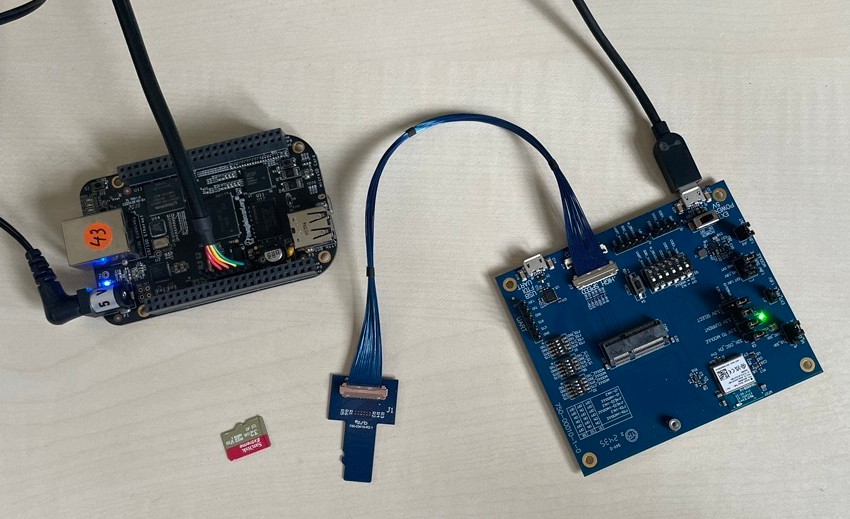
Building and Running the Yocto Image
Prerequisites on build machine
sudo apt-get install bc gawk wget git diffstat unzip texinfo gcc-multilib \
build-essential chrpath socat cpio python3 python3-pip python3-pexpect \
xz-utils debianutils iputils-ping libsdl1.2-dev xterm libncurses5-dev \
pkg-config socat subversion texi2html texinfo u-boot-tools\
Download Yocto
mkdir bbb
cd bbb
git clone git://git.yoctoproject.org/poky
cd poky
git checkout scarthgap
Download BeagleBone black BSP
git clone git://git.yoctoproject.org/meta-ti
cd meta-ti
git checkout scarthgap
cd ..
Initialize environment
source oe-init-build-env build_bbbNote: This creates a build directory (build_bbb) and changes to it.
Adjust bblayers.conf
cd conf
nano bblayers.conf
Add the path to TI's meta-ti layer via the BBLAYERS variable:
# POKY_BBLAYERS_CONF_VERSION is increased each time build/conf/bblayers.conf
# changes incompatibly
POKY_BBLAYERS_CONF_VERSION = "2"

BBPATH = "${TOPDIR}"
BBFILES ?= ""

BBLAYERS ?= " \
  /home/alex/Projects/yocto/bbb/poky/meta \
  /home/alex/Projects/yocto/bbb/poky/meta-poky \
  /home/alex/Projects/yocto/bbb/poky/meta-yocto-bsp \
  /home/alex/Projects/yocto/bbb/poky/meta-ti \
"Note: Save the changes!
Adjust local.conf
Find the following passage in local.conf and remove the '#' in front of the beaglebone-yocto line (line 5 below).
MACHINE ?= "beaglebone-yocto"
…
There are also the following hardware board target machines included for
demonstration purposes:

MACHINE ?= "beaglebone-yocto"
#MACHINE ?= "genericarm64"
#MACHINE ?= "genericx86"
#MACHINE ?= "genericx86-64"
…Note: Save the changes!
Troubleshooting: Fixing missing layer.conf file error in ‘meta-ti’ layer
You may witness the following error:
FileNotFoundError: [Errno 2] file /home/alex/Projects/yocto/bbb/poky/meta-ti/conf/layer.conf not foundThe solution to the above is as follows:
mkdir <poky-dir>/meta-ti/conf
touch <poky-dir>/meta-ti/conf/layer.conf
Build first image
cd ..
bitbake core-image-baseNote: In our testing, we initially found a fetch error (gperf). The solution was to start a bitbake process again, which overcame the issue.
Flashing image to SD card
The newly built image can be found at:
../poky/build_bbb/tmp/deploy/images/beaglebone-yoctoFlash this image to an SD card with Linux tool “dd:”
Note: Be VERY careful to select the correct target (denoted in the of= argument below)
sudo dd if=core-image-base-beaglebone-yocto.rootfs.wic of=/dev/mmcblk0 bs=1M conv=syncInsert the SD card into the BeagleBone and push the boot switch while applying power. This ensures the BeagleBone will boot from the SD card.
Gaining console access on BeagleBone black
You can use the information on the following page to gain console access to the BeagleBone Black:
Note: Other USB/Serial converters might work as well.
Flashing internal eMMC of the Beaglebone to free the SD card slot for the Sona TI351
The following command shows the available block devices on the BBB:
root@beaglebone-yocto:~# ls /dev/mmc* -al
brw-rw----    1 root     disk      179,   8 Jan  1  2000 /dev/mmcblk0
brw-rw----    1 root     disk      179,   9 Jan  1  2000 /dev/mmcblk0p1
brw-rw----    1 root     disk      179,  10 Jan  1  2000 /dev/mmcblk0p2
brw-rw----    1 root     disk      179,   0 Jan  1  2000 /dev/mmcblk1
brw-rw----    1 root     disk      179,  16 Jan  1  2000 /dev/mmcblk1boot0
brw-rw----    1 root     disk      179,  24 Jan  1  2000 /dev/mmcblk1boot1
brw-rw----    1 root     disk      179,   1 Jan  1  2000 /dev/mmcblk1p1
crw-------    1 root     root      247,   0 Jan  1  2000 /dev/mmcblk1rpmb
Line 5 above, mmcblk1, is the internal eMMC memory.
Write the contents of the SD card (mmcbkl0) to the internal emmc memory (mmcblk1) as follows:
root@beaglebone-yocto:~# dd if=/dev/mmcblk0 of=/dev/mmcblk1 bs=1MNote: Power off the Beaglebone, remove the microSD card, and restart the Beaglebone:

Adding software for the Sona-IF351 Wi-Fi module
Adding Ezurio's Yocto meta layer to the build environment
Back on the build machine, in the Poky layer, execute the following command:
alex@bigNUC:~/Projects/yocto/bbb/poky$ git clone https://github.com/Ezurio/meta-summit-radio/
Cloning into 'meta-summit-radio'...
remote: Enumerating objects: 4715, done.
remote: Counting objects: 100% (229/229), done.
remote: Compressing objects: 100% (96/96), done.
remote: Total 4715 (delta 164), reused 171 (delta 128), pack-reused 4486 (from 1)
Receiving objects: 100% (4715/4715), 936.14 KiB | 5.38 MiB/s, done.
Resolving deltas: 100% (3003/3003), done.

alex@bigNUC:~/Projects/yocto/bbb/poky$ cd meta-summit-radio/
alex@bigNUC:~/Projects/yocto/bbb/poky/meta-summit-radio$ git checkout lrd-12.103.8.x
Branch 'lrd-12.103.8.x' set up to track remote branch 'lrd-12.103.8.x' from 'origin'.
Switched to a new branch 'lrd-12.103.8.x'
Adjust bblayer.conf to add ‘meta-summit-radio’ layer
alex@bigNUC:~/Projects/yocto/bbb/poky/build_bbb/conf$ nano bblayers.confPOKY_BBLAYERS_CONF_VERSION is increased each time build/conf/bblayers.conf
changes incompatibly
POKY_BBLAYERS_CONF_VERSION = "2"
BBPATH = "${TOPDIR}"
BBFILES ?= ""
BBLAYERS ?= " \
/home/alex/Projects/yocto/bbb/poky/meta \
/home/alex/Projects/yocto/bbb/poky/meta-poky \
/home/alex/Projects/yocto/bbb/poky/meta-yocto-bsp \
/home/alex/Projects/yocto/bbb/poky/meta-ti \
/home/alex/Projects/yocto/bbb/poky/meta-summit-radio/meta-summit-radio \
"Note: Save the changes!
Adjust local.conf file to include Ezurio and other required or useful recipes
Add to local.conf:
# added by user for Ezurio:
CORE_IMAGE_EXTRA_INSTALL += "\
pulseaudio \
ethtool \
iw \
openssh \
kernel-module-ti-backports \
ti351-firmware \
summit-supplicant-ti \

PREFERRED_RPROVIDER_wpa-supplicant = "summit-supplicant-ti"
PREFERRED_RPROVIDER_wpa-supplicant-cli = "summit-supplicant-ti"
PREFERRED_RPROVIDER_wpa-supplicant-passphrase = "summit-supplicant-ti"
PREFERRED_RPROVIDER_wireless-regdb-static = "wireless-regdb"Note: Save the changes!
Fixing missing layer.conf file error in 'meta-summit-radio' layer
You may witness the following error:
FileNotFoundError: [Errno 2] file /home/alex/Projects/yocto/bbb/poky/meta-summit-radio/conf/layer.conf not foundThe solution to the above is as follows::
mkdir <poky-dir>/meta-summit-radio/conf
touch <poky-dir>/meta-summit-radio/conf/layer.conf
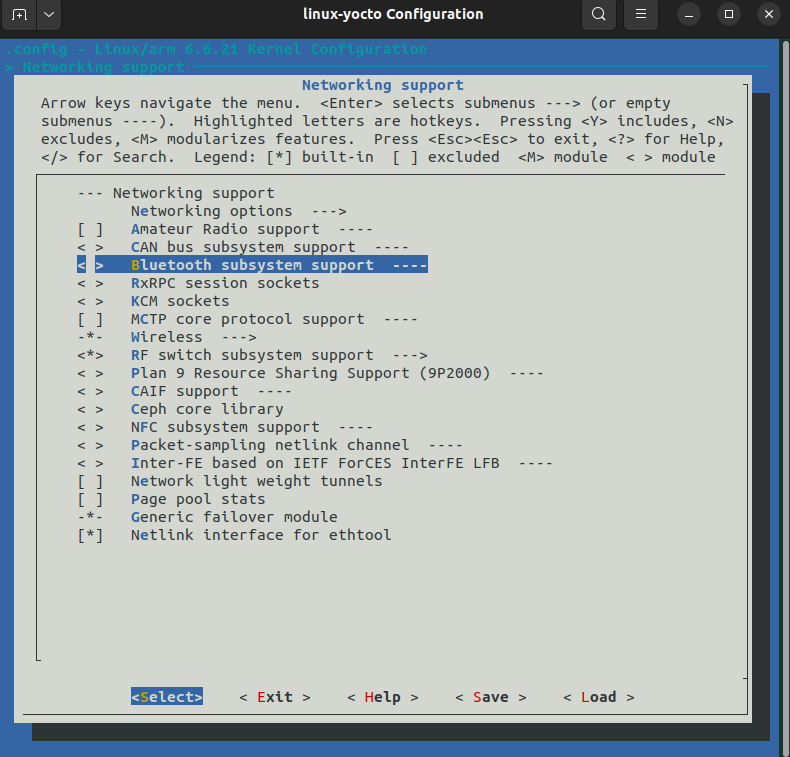
Prepare kernel config for Ezurio backports
Run the following command:
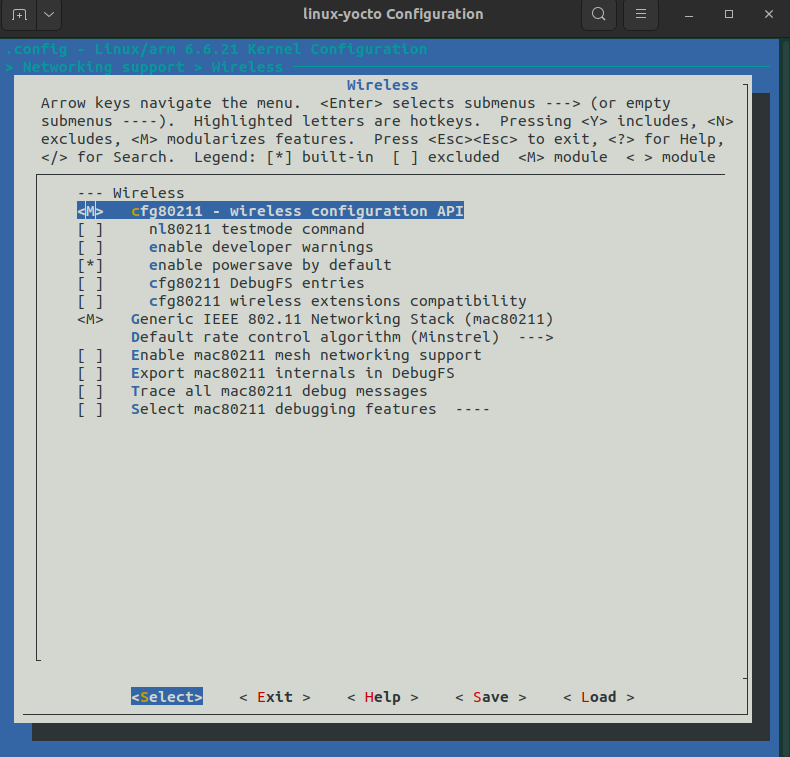
bitbake -c menuconfig virtual/kernelRemove the Bluetooth subsystem:
Set ‘Wireless’ to <M>:
Remove Wireless LAN driver as highlighted below:
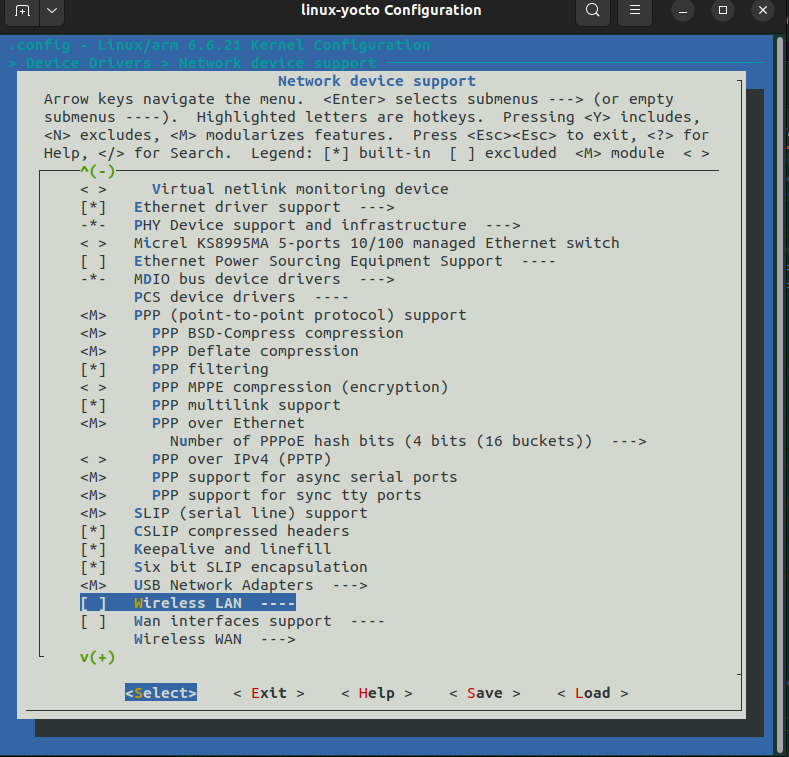
Add ECDH support as highlighted below:
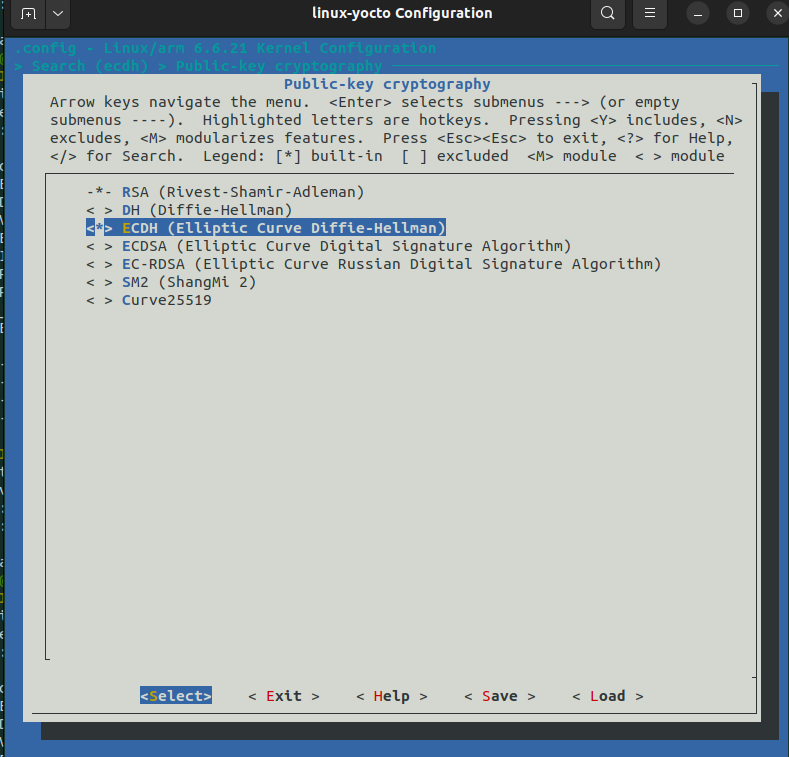
Note: Save the changes!
Adjust BBB device tree for TI351
In the following directory:
../poky/build_bbb/tmp/work-shared/beaglebone-yocto/kernel-source/arch/arm/boot/dts/ti/omap$
…add this to the file 'am335x-bone-common.dtsi'
vmmc-supply = <®_usdhc1_vmmc>;
max-frequency = <50000000>;
cap-power-off-card;
#address-cells = <1>;
#size-cells = <0>;
wlcore: wlcore@2 {
compatible = "ti,cc33xx";
reg = <2>;
};under node:
&mmc1 {
status = "okay";
bus-width = <0x4>;
pinctrl-names = "default";
pinctrl-0 = <&mmc1_pins>;
cd-gpios = <&gpio0 6 GPIO_ACTIVE_LOW>;
vmmc-supply = <®_usdhc1_vmmc>;
max-frequency = <50000000>;
cap-power-off-card;
#address-cells = <1>;
#size-cells = <0>;
wlcore: wlcore@2 {
compatible = "ti,cc33xx";
reg = <2>;
};
};Build the image that includes Sona-TI351 software and adjusted device tree
Compile the device tree as follows:
alex@bigNUC:~/Projects/yocto/bbb/poky/build_bbb$ bitbake linux-yocto -f -c compileRepeat the steps for building the Yocto image, and flashing the emmc memory of the BB via SD card.
Final results
Boot the BeagleBone and log in:
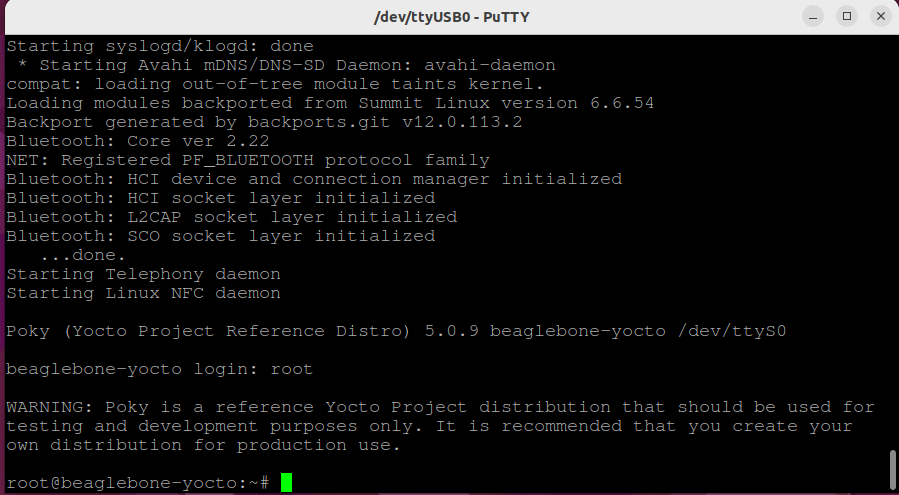
Observe the correct placement of the TI351 firmware:

Insert the TI351 DVK into the microSD card slot and observe the following console output:
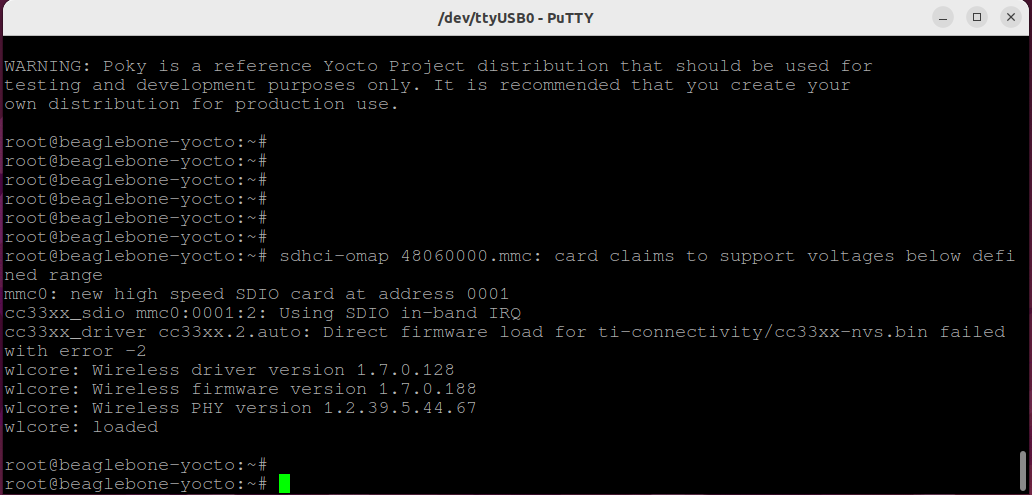

Verify the availability of the wlan0 interface:
