BL54L10 Series - Bluetooth LE + 802.15.4 + NFC

Overview
Experience a new pinnacle of flexibility, performance, efficiency, and security with our new BL54L10 series, built on Nordic Semiconductor's powerful nRF54 silicon. Elevating what you know and love from the nRF52 series, this next generation redefines Bluetooth LE and 802.15.4 solutions. The BL54L10 enables flexibility in design choice and future proofing with drop in memory and RAM module options with its sister part, the BL54L15.
Powered by Nordic's nRF54L10 SoC, our compact BL54L10 modules deliver secure and robust Bluetooth LE and 802.15.4 with flexible programming via the Nordic SDK, Zephyr RTOS and Canvas Software Suite.
Featuring a 128MHz ARM Cortex M33 and 128MHz RISC-V coprocessor, supported by 1.0 MB non-volatile memory and 192 KB RAM, the BL54L10 modules offer a reduced flash and RAM option versus the BL54L15, all in the same footprint. The BL54L10 series brings out all nRF54L10 hardware features and capabilities including up to +7 dBm transmit power, 1.7V – 3.6V supply considerations, and NFC A-Tag implementation.
It’s further enhanced with state-of-the-art security and is designed for PSA Certified level 3. It supports services such as Secure Boot, Secure Firmware Update, Secure Storage plus protection from physical attacks.
Buy Now
| Seller | Stock | Buy |
|---|---|---|
 |
4495 in stock | Buy |
 |
818 in stock | Buy |
 |
190 in stock | Buy |
 |
0 in stock | Buy |
|
0 in stock | Buy |
|
0 in stock | Buy |
 |
0 in stock | Buy |
|
0 in stock | Buy |
|
0 in stock | Buy |
|
0 in stock | Buy |
|
0 in stock | Buy |
|
0 in stock | Buy |
|
10582 in stock | Buy |
|
4155 in stock | Buy |
|
4155 in stock | Buy |
|
502 in stock | Buy |
|
0 in stock | Buy |
|
0 in stock | Buy |
|
0 in stock | Buy |
|
0 in stock | Buy |
|
93 in stock | Buy |
|
48 in stock | Buy |
|
9 in stock | Buy |
 |
1 in stock | Buy |
|
0 in stock | Buy |
|
0 in stock | Buy |
|
37 in stock | Buy |
|
18 in stock | Buy |
|
8 in stock | Buy |
|
5 in stock | Buy |
|
0 in stock | Buy |
|
0 in stock | Buy |
|
245 in stock | Buy |
|
156 in stock | Buy |
|
0 in stock | Buy |
|
0 in stock | Buy |
|
0 in stock | Buy |
|
1589 in stock | Buy |
|
0 in stock | Buy |
|
0 in stock | Buy |
|
0 in stock | Buy |
|
250 in stock | Buy |
|
226 in stock | Buy |
|
0 in stock | Buy |
|
0 in stock | Buy |
|
0 in stock | Buy |
|
975 in stock | Buy |
|
0 in stock | Buy |
|
0 in stock | Buy |
|
0 in stock | Buy |
|
1440 in stock | Buy |
|
452 in stock | Buy |
|
104 in stock | Buy |
|
0 in stock | Buy |
|
7746 in stock | Buy |
|
284 in stock | Buy |
|
0 in stock | Buy |
|
0 in stock | Buy |
|
388 in stock | Buy |
|
139 in stock | Buy |
|
139 in stock | Buy |
|
139 in stock | Buy |
|
89 in stock | Buy |
|
0 in stock | Buy |
|
0 in stock | Buy |
Dev Kits
Jumpstart your development in minutes with our powerful development kits.
/filters:background_color(white)/2025-01/453-00001-K1-md.png)
/filters:background_color(white)/2025-01/453-00044-K1-md.png)
Certified Antennas
Simplify compliance with antennas tested and certified for this module.
-
/filters:background_color(white)/2024-10/i-FlexPIFA-21.4-EFG2400A-view3.png)
EFG2400A3S-10MH4L
i-FlexPIFA™ Series Inverted Flexible PIFA Antennas
-
/filters:background_color(white)/2024-10/2.4-GHz-FlexPIFA.png)
001-0022
FlexPIFA / FlexPIFA 6E Flexible Adhesive-Backed PIFA Internal Antennas
-
/filters:background_color(white)/2024-12/mFlexPIFA-standalone-transparent.png)
EFA2400A3S-10MH4L
mFlexPIFA Flexible Adhesive-Backed PIFA Internal Antenna
-
/filters:background_color(white)/2024-12/ANT-DS-NanoBlue-Main-Image.png)
EBL2400A1-10MH4L
NanoBlue Series Bluetooth Internal Antenna
-
/filters:background_color(white)/2024-12/NFC-Antenna1.png)
0600-00061
NFC Flex PCB Antenna
Specifications
Processing
1x RISC-V co-processor @ 128 MHz VPR
Connectivity
802.15.4
NFC
Features
Environment
Packaging
Software
Nordic nRF Connect SDK
Zephyr RTOS
Power
| Part Number | Price @ 1K | Antenna Type | Chipset (Wireless) | Frequency | Interfaces - General | OS/Software | Packaging | Product Type | System Architecture | Technology |
|---|---|---|---|---|---|---|---|---|---|---|
/filters:background_color(white)/2024-06/BL54L10-TraceAnt.png) 453-00225C Active Buy Options | N/A | PCB Trace | Nordic nRF54L10 SoC | 2.4 GHz | UART, NFC A-Tag, SPI, TWI, HS-SPI, I2S, PWM, ADC, GPIO, QDEC, WDT, LPCOMP | Canvas Software Suite, Nordic SDK, Zephyr | Cut Tape | Embedded Module | Hosted | Bluetooth Core 6.2, Single Mode (BLE) |
453-00225R Active Buy Options | N/A | PCB Trace | Nordic nRF54L10 SoC | 2.4 GHz | UART, NFC A-Tag, SPI, TWI, HS-SPI, I2S, PWM, ADC, GPIO, QDEC, WDT, LPCOMP | Canvas Software Suite, Nordic SDK, Zephyr | Tape/Reel | Embedded Module | Hosted | Bluetooth Core 6.2, Single Mode (BLE) |
/filters:background_color(white)/2024-06/BL54L10-MHF4.png) 453-00226C Active Buy Options | N/A | External, MHF4 Connector | Nordic nRF54L10 SoC | 2.4 GHz | UART, NFC A-Tag, SPI, TWI, HS-SPI, I2S, PWM, ADC, GPIO, QDEC, WDT, LPCOMP | Canvas Software Suite, Nordic SDK, Zephyr | Cut Tape | Embedded Module | Hosted | Bluetooth Core 6.2, Single Mode (BLE) |
453-00226R Active Buy Options | N/A | External, MHF4 Connector | Nordic nRF54L10 SoC | 2.4 GHz | UART, NFC A-Tag, SPI, TWI, HS-SPI, I2S, PWM, ADC, GPIO, QDEC, WDT, LPCOMP | Canvas Software Suite, Nordic SDK, Zephyr | Tape/Reel | Embedded Module | Hosted | Bluetooth Core 6.2, Single Mode (BLE) |
Documentation
Browse Certifications, Datasheets, Documentation, Product Briefs, Software and Technical Drawings in our Support & Documentation Center.
Does Bluetooth Channel Sounding Require Specific Radio Hardware Capabilities?
Yes, Bluetooth Channel Sounding requires specific hardware features and hence not every BLE radio can do Channel Sounding. Below is a breakdown of why specific hardware is required:
1. New Hardware Capabilities
- Unique Radio Requirements: The Channel Sounding (CS) feature mandates specialized hardware capable of performing Phase-Based Ranging (PBR) and Round-Trip Time (RTT) measurements.
- Specific SoCs: Currently, this functionality is supported by next-generation SoCs like the Nordic nRF54L15/L10 and nRF54H20 series. Older BLE chips (e.g., nRF52 series) do not have the necessary radio circuitry to generate these specific tones or handle the precise timing required.
- Antenna Requirements: For maximum accuracy, the hardware often requires dual-antenna support to perform angle-of-arrival calculations, which is not present in all BLE devices.
2. Specialized Packet Formats and Tone Generation
- CS Sync Packets: These are not standard advertising or data packets. They are specialized packets with cryptographic protections (using a dedicated CS Deterministic Random Bit Generator) used for synchronizing timing between the Initiator and Reflector.
- CS Tone Packets: These are Amplitude Shift Keying (ASK) modulated tones used to measure phase rotation to determine distance. This requires specific analog radio hardware to generate and detect these tones rather than just typical GFSK modulation.
3. Tight Timing Requirements
- Channel sounding requires extreme timing precision to calculate distance via RTT (Time of Flight). The CS step involves rapid, bi-directional exchanges of packets and tones, often with very fast frequency hopping (T_FCS). This cannot be supported by traditional BLE firmware/hardware.
What GPIO Ports can be used to generate Events on the BL54L modules?
Port 0 (Low power domain) and Port 1 (Peripheral Domain) I/O
pins allow for enabling GPIOs to generate events on pin state change with one
of the following input conditions:
• Rising edge
• Falling edge
• Any change
These two ports also allow I/O pins to wake the system from System
OFF or System ON as well as being configured for GPIO Sense/Detect.
Port 2 (MCU Domain) does not allow Events to be generated on
its GPIO pins and cannot wake the system from sleep. P2 does not have the GPIO
SENSE or DETECT mechanism.
The following table lists the BL54L ports capabilities.

For further details refer to GPIO Port
Capabilities.
Which BL54L15, L15µ, L10 and LM20A peripherals can operate concurrently, and what are the GPIO pin mapping rules?
On the nRF54 family, peripheral instances that share the same ID and base address (e.g., SPIM00, SPIS00, TWIM00, UARTE00, all mapped to the same ID) cannot be used simultaneously. You must disable one peripheral before enabling another on that same ID, specifically clearing the peripheral's ENABLE register.
Here is a breakdown of simultaneous usage, restrictions, and shared resources based on the nRF54L15 architecture:
Peripherals That Cannot Be Used Simultaneously
- Shared Instance ID Peripherals: Peripherals with the same ID, such as SPI00, SPIM00, SPIS00, TWI00, TWIM00, TWIS00, and UARTE00 (collectively 00), are mutually exclusive. Only one can be active at a time.
- Pin-Colliding Peripherals: If two peripherals are assigned to the same GPIO pin through the PSEL register, they cannot operate simultaneously.
- QSPI/SPIM00 Limitations: While sQSPI (soft QSPI) and SPIM00 can often coexist, they cannot share the same pins, and on some configurations, the QSPI CSN pin is shared with the SPIM CSN, preventing simultaneous operation.
- Radio and High-Speed Peripherals: While high-speed UARTE (up to 4 Mbps) and SPIM (up to 32 MHz) can run simultaneously with other peripherals, extreme bus traffic may impact real-time performance.
Peripherals That Can Be Used Simultaneously
- Different Instances: You can run multiple instances of similar peripherals simultaneously if they have different IDs (e.g., UARTE20 and UARTE00 can run at the same time, as they are in different power domains).
- Dedicated Peripherals: Peripherals with unique IDs in the address map (e.g., QSPI and ADC, or Timers and PWM) can generally be used at the same time.
- VPR Core (FLPR) and Main CPU: The FLPR (Fast Lightweight Peripheral Processor) can handle specific peripherals (like I2C/SPI) in parallel with the main ARM Cortex-M33 processor.
- DPPI (Distributed Programmable Peripheral Interconnect): You can connect events and tasks between multiple independent peripherals without CPU intervention.
Key Limitations and Rules
- Power Domains: Peripherals with numeric IDs starting with 2 (e.g., UARTE20) are in the Peripheral domain (16 MHz), while those with 0 (e.g., UARTE00) are in the MCU domain (128 MHz). Mixing them generally allows for concurrent operation.
- P2 Port Conflict: The Peripheral domain uses dedicated GPIO Port 2 (P2). If multiple peripherals are assigned to the same P2 pins, they will conflict.
- Switching Rule: To switch between two peripherals sharing an ID:
- Disable the previously used peripheral.
- Disable any DPPI channel connections.
- Clear all bits in the INTEN register.
- Configure the new peripheral.
GPIO Pin Mapping
- Basic rule is that peripheral instances of a certain power domain can only be mapped to the GPIO port of this power domain e.g., SPIM00 or UARTE00 can only be mapped to GPIO P2 (see block diagram at https://docs.nordicsemi.com/bundle/ps_nrf54L15/page/overview.html)
- Some peripherals allow for "cross power-domain usage" e.g., UARTE20/21 would usually go to P1 but can connect across power domains to dedicated pins on P2.
- It's mainly about following the rules in this section of the data sheet: https://docs.nordicsemi.com/bundle/ps_nrf54L15/page/chapters/pin.html
Can python scripts be loaded onto my device via SWD if no UART is available?
Python scripts can only be loaded onto a Canvas enabled
device via serial interface such as UART or USB. Canvas FW is programmed over
SWD programming interface only.
Ensure your custom hardware design has provisions for both SWD for Canvas FW programming and serial for loading python scripts.
Review the README.md of the canvas_python_firmware repository (https://github.com/Ezurio/canvas_python_firmware) for the hardware platform to locate the "Default REPL port"
When building an application with nRF Connect for VS Code, which Board Target should I select for my Ezurio BL54Lxx DVK?
When building an application in nRF Connect for VS Code you must add a build configuration, which includes selecting the board target that your application will be run on. When working with Ezurio's BL54L15, BL54L15u, or BL54L10 you should select the board as follows:
1) Click the in the field for the target board selection and type, "BL54 " to reduce the number of board targets listed to only the BL54 series of boards.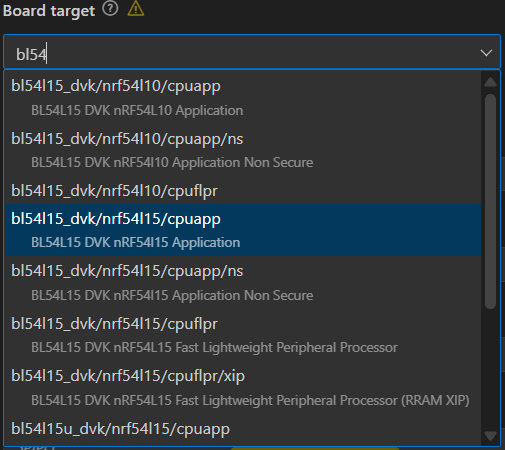
The board file variant selects the CPU core and security
model the build will target. On the 54 Series you will see variants such as cpuapp,
cpuapp/ns, cpuflpr, and cpuflpr/xip
cpuapp:
Refers to the application core,
where Zephyr application firmware is run. This selection builds for the
app core with security features enabled (Trust Zone Secure).
*This build is recommended for
most use cases.
cpuappns:
This variant builds a non-secure
application image which runs alongside a secure image on Trust Zone-enabled
devices where the the application core is partitioned into a secure domain and
non-secure domain. The secure image is usually generated by Trusted Firmware-M
or a secure bootloader).
This is typically used when developing the main application, while the secure
firmware handles crypto keys and secure services.
cpuflpr:
Refers to builds for the network
core also known as the Fast Lightweight Processor (flpr).
The network core is usually
dedicated to the radio stack (BLE, 802.15.4, etc)
This build is typically used to add
custom firmware directly on the network core, instead of using Nordic's
precompiled controller firmware.
cpuflpr/xip:
The /xip variant means execute
in place
This image is built to run directly
from external flash, rather than being copied to RAM.
This is useful if the core firmware is too large to fit into RAM, or if it is desired to save RAM usage by running the code directly from flash.
When working with the BL54L15 DVK or BL54L15u DVK most use
cases should select bl54l15_dvk/nrf54l15/cpuapp.
NOTE: When developing with the BL54L15 DVK for an
application that will run on the BL54L10 module it is
recommended that you select bl54l15_dvk/nrf54l10/cpuapp. This variant
enforces the reduced memory constraints that apply when working with the
BL54L10.
Does the BL54L15 support LE Audio?
The nRF54L15
BLE MCU used on the BL54L15 does not include an Audio PLL making it only
possible to be used in a limited number of applications. The Audio PLL is
used for isochronous channel synchronization for L and R streams meaning True
Wireless Stereo (TWS) can’t be supported. However, other applications that do
not need this may be able to use the BL54L15 in an Audio solution.
Become an Ezurio Customer to Gain Exclusive Access to Our Design Experts
- Antenna Scans
- Antenna selection and placement
- Custom antenna design
- Worldwide EMC testing / certifications
- Embedded RF hardware / firmware design
- Cloud architecture and integration
- Mobile application development
- Product & Industrial Design
Distributors
| Distributor | Phone Number | Region | Website |
|---|---|---|---|
| Arrow Electronics | 1-855-326-4757 +44 2039 365486 |
APAC, North America, South America, EMEA | Website |
| Braemac Australia, New Zealand, South East Asia | +61 2 9550 6600 +64 9 477 2148 |
APAC | Website |
| DigiKey | 1-800-344-4539 |
North America, South America, APAC, EMEA | Website |
| EBV Elektronik | EMEA | Website | |
| Farlink Technology China, Hong Kong | +86 13266922199 |
APAC | Website |
| Farnell | 1-800-936-198 +44 3447 11 11 22 |
EMEA | Website |
| Future Electronics | 1-800-675-1619 1-514-428-8470 |
North America, South America, APAC, EMEA | Website |
| Glyn | +49-6126-590-0 |
EMEA | Website |
| Hy-Line Germany Only | +49 89 614 503 0 |
EMEA | Website |
| Jetronic China, Hong Kong and Taiwan | 852-27636806 |
APAC | Website |
| M2M Germany | +49-6081-587386-0 |
EMEA | Website |
| Martinsson | +46 8 7440300 |
EMEA | Website |
| McCoy South East Asia | +65 6515 2988 |
APAC | Website |
| Mouser Electronics | 1-800-346-6873 +44 1494 427500 |
North America, South America, APAC, EMEA | Website |
| RS | +852-2421-9898 +44 3457-201201 |
North America, South America, APAC, EMEA | Website |
| Solsta UK Only | +44 (0) 1527 830800 |
EMEA | Website |
| Supreme Components International India, South East Asia | +65 6848-1178 |
APAC | Website |
| Symmetry Electronics | 1-866-506-8829 |
North America | Website |
| Tekdis Australia and New Zealand | +61 3 8669 1210 |
APAC | Website |
| Telsys | +972 3 7657666 |
EMEA | Website |
| WPG | +44 1628 958460 |
EMEA | Website |