/filters:background_color(white)/2024-06/BL54L10-Group.png)
/filters:background_color(white)/2024-01/BL54L15-Group.png)
/filters:background_color(white)/2024-06/BL54L15ug_SA%20and%20ST-right11.363.png)
Answer
When building an application in nRF Connect for VS Code you must add a build configuration, which includes selecting the board target that your application will be run on. When working with Ezurio's BL54L15, BL54L15u, or BL54L10 you should select the board as follows:
1) Click the in the field for the target board selection and type, "BL54 " to reduce the number of board targets listed to only the BL54 series of boards.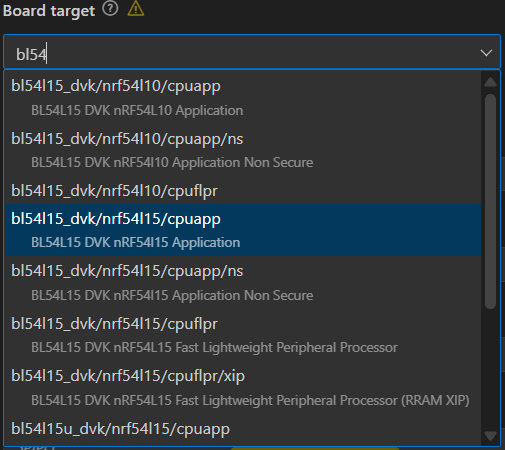
The board file variant selects the CPU core and security model the build will target. On the 54 Series you will see variants such as cpuapp, cpuapp/ns, cpuflpr, and cpuflpr/xip
cpuapp:
Refers to the application core, where Zephyr application firmware is run. This selection builds for the app core with security features enabled (Trust Zone Secure).
*This build is recommended for most use cases.
cpuappns:
This variant builds a non-secure application image which runs alongside a secure image on Trust Zone-enabled devices where the the application core is partitioned into a secure domain and non-secure domain. The secure image is usually generated by Trusted Firmware-M or a secure bootloader).
This is typically used when developing the main application, while the secure firmware handles crypto keys and secure services.
cpuflpr:
Refers to builds for the network core also known as the Fast Lightweight Processor (flpr).
The network core is usually dedicated to the radio stack (BLE, 802.15.4, etc)
This build is typically used to add custom firmware directly on the network core, instead of using Nordic's precompiled controller firmware.
cpuflpr/xip:
The /xip variant means execute in place
This image is built to run directly from external flash, rather than being copied to RAM.
This is useful if the core firmware is too large to fit into RAM, or if it is desired to save RAM usage by running the code directly from flash.
When working with the BL54L15 DVK or BL54L15u DVK most use cases should select bl54l15_dvk/nrf54l15/cpuapp.
NOTE: When developing with the BL54L15 DVK for an application that will run on the BL54L10 module it is recommended that you select bl54l15_dvk/nrf54l10/cpuapp. This variant enforces the reduced memory constraints that apply when working with the BL54L10.