/filters:background_color(white)/2024-03/Lyra%2024%20-%20Collection1.png)
/filters:background_color(white)/2024-10/LYRA-P and LYRA-S render.380.png)
Answer
Ezurio provides .gbl files for AT Interface application as well as DTM FW used for regulatory test modes. However, for custom applications based on Simplicity Studio SDK a user must create their own gbl file for DFU.
Using Simplicity Studio as the IDE for development a set of binaries of format .axf, .bin. .hex and .s37 are generated but no gbl formatted files. Sample applications in Simplicity Studio provide a batch file in the project structure named create_bl_files.bat (.py and .sh provided as well).
Simply double clicking on the create_bl_files.bat will create several .gbl files. It is recommended to program the .gbl file with the -crc suffix, as this contains a CRC-32 checksum. The bootloader uses the CRC-32 to verify the firmware’s integrity both at startup and when applying a new firmware update package via the Serial DFU (UART) method.
This can now be used with the Lyra_24_USB_module_UART_DFU_v1.0.0 utility as described in the Firmware Options and Upgrade Methods Guide:
https://www.ezurio.com/documentation/user-guide-firmware-options-and-upgrading-lyra-22-24-series
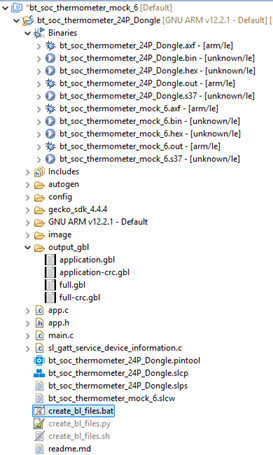
In some cases, the create_bl_files.bat or create_bl_files.sh scripts might not be present by default. If so, you can try adding them manually by installing the Application OTA DFU component via: my_project_name.slcp → Software Components → Bluetooth → OTA.