/filters:background_color(white)/2024-12/RS2xx-Internal%20Sensor-1.png)
Introduction
This application note supplements the RS26x LoRa Protocol Application Note
by providing practical examples of RS26x LoRaWAN application payloads.
The protocol specification defines the message structure, namespaces, tags, data types, and configuration parameters supported by the RS26x. This document focuses on how those definitions appear in actual uplink and downlink payloads and walks through the payloads byte by byte.
The examples include normal temperature measurements, aggregation and averaging modes, negative temperatures, backlog data, and configuration messages. Each example shows the captured payload, its structure, and how the individual fields are decoded into meaningful values.
Tested Software Versions
The examples in this document were captured using an RS262 running the following software versions:
| Component | Version |
|---|---|
| Canvas Firmware | 2.1.0+1755145051 |
| Application Version | 1.0.3+1760637975 |
Key Protocol Terms
Tag
A Tag identifies the specific data item that follows in the payload. The Tag definition determines how the associated value should be interpreted, including its length, data type, and scaling.
For example:
Tag 0x00 = Temperature
Tag 0x01 = Temperature Backlog
Tag 0x02 = Aggregated Temperature
Message Identifier
The Message Identifier identifies the function of the protocol message. Its meaning depends on whether the message is an uplink or a downlink.
| Direction | Message Identifier | Message Type |
|---|---|---|
| Uplink | 0x00 | Sensor Data |
| Uplink | 0x01 | Configuration Data |
| Downlink | 0x00 | Configuration Get |
| Downlink | 0x01 | Configuration Set |
Status Byte
Status Byte contains the current battery status and device status indications, such as Sensor Fault, Bandwidth Limitation, or Backlog Messages Available.
Tag-Value Pair
The body of an RS26x message is composed of Tag-Value pairs:
Tag | ValueFor example:
00 | 1A FB
│      │
│      └── Temperature value = 26.98 °C
└───────── Tag 0x00 = Temperature
Normal Internal Temperature Uplink
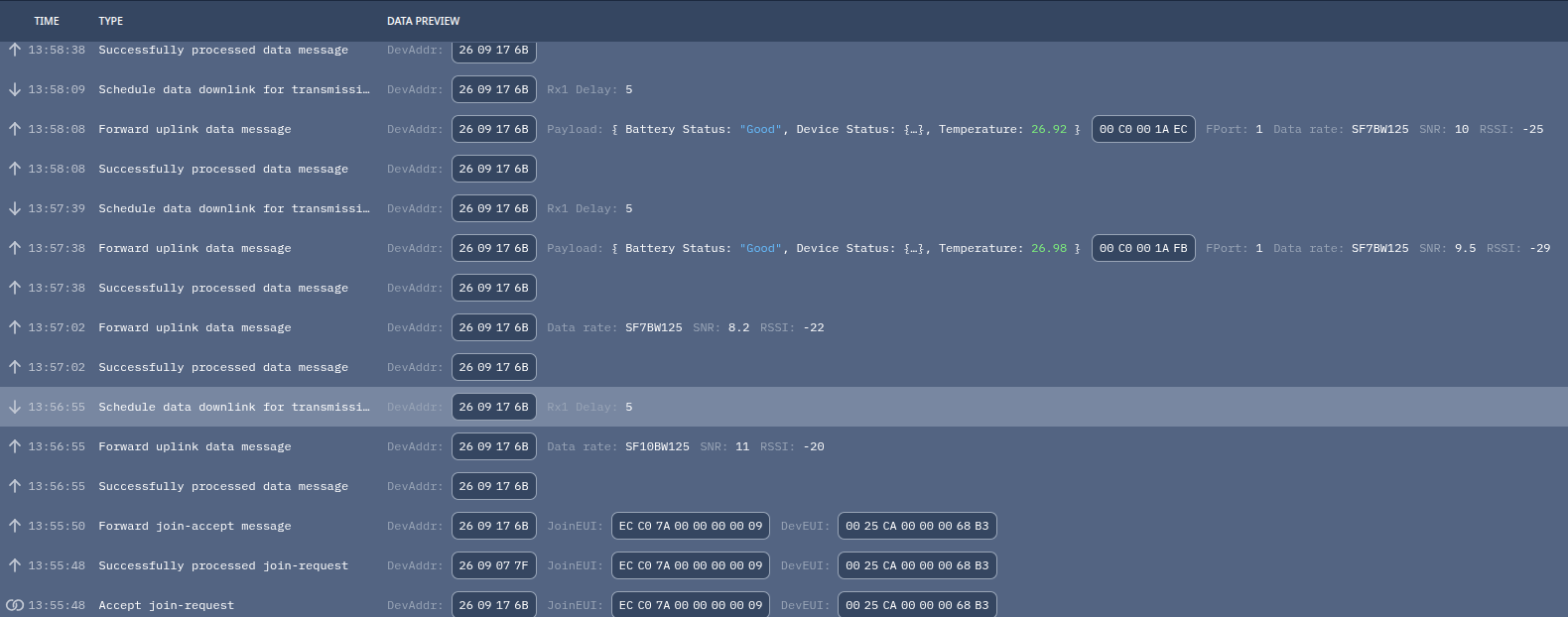
Captured payload
00 C0 00 1A FBPayload Visualization
00 | C0 | 00 | 1A FB
│    │    │      │
│    │    │      └── Temperature = 26.98 °C
│    │    └───────── Tag 0x00 = Temperature
│    └────────────── Status = Good battery, no status flags
└─────────────────── API Version 0, Sensor Data Message
Payload Breakdown
| Byte(s) | Hex | Field | Description | Decoded Value |
|---|---|---|---|---|
| 0 | 00 | Message Header | Upper 4 bits = API Version; lower 4 bits = Message Identifier | API Version 0, Sensor Data Message ID 0 |
| 1 | C0 | Status Byte | Upper 2 bits = Battery Status; lower 6 bits = Device Status | Battery = Good; no device status flags |
| 2 | 00 | Tag | Namespace 0, Tag 0 = Temperature | Internal Temperature |
| 3–4 | 1A FB | Value | Signed 16-bit temperature in Q8 fixed-point format | 0x1AFB / 256 = 26.9805 °C |
Value Conversion
Status
0xC0 = 1100 0000
       ^^   ^^^^^^
       │       │
       │       └─ Device Status = 0x00
       └───────── Battery Status = 3 = Good
Temperature
Raw temperature = 0x1AFB
                = 6907 decimal

Temperature = 6907 / 256
            = 26.98046875 °C
            ≈ 26.98 °C
Aggregated Internal Temperature Uplink
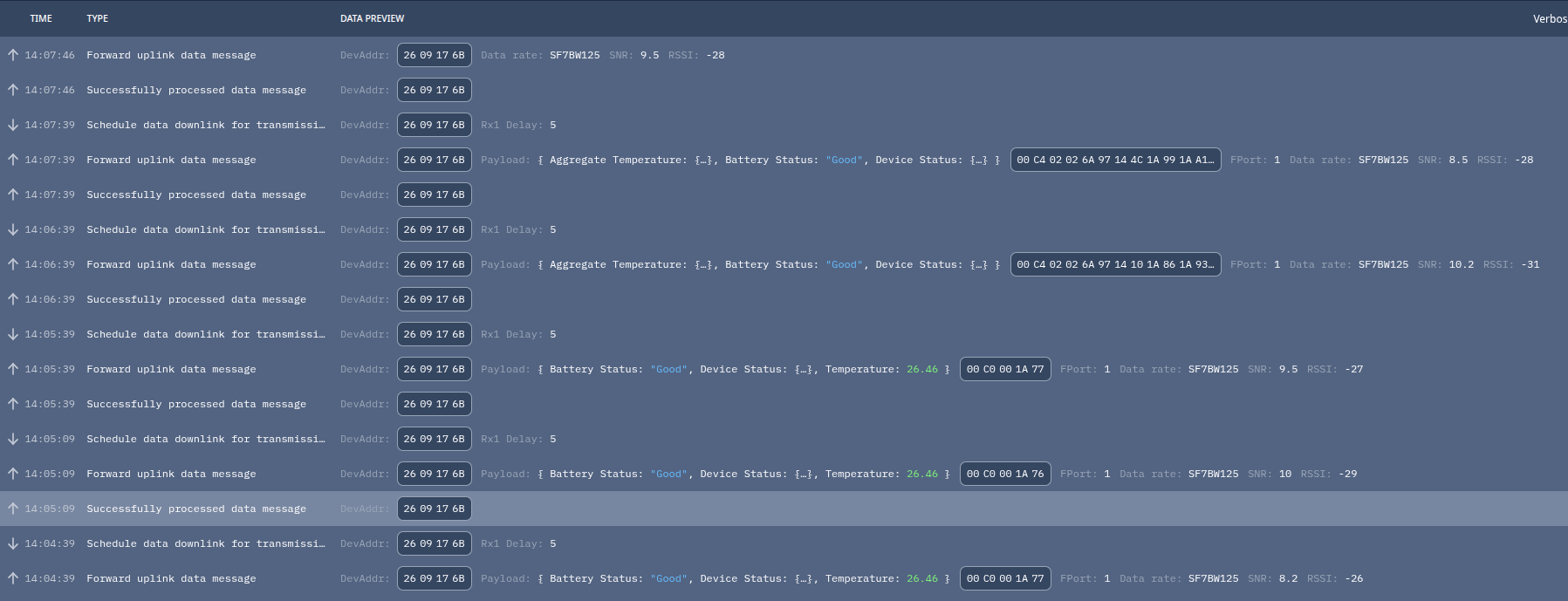
Captured payload
00 C4 02 02 6A 97 14 4C 1A 99 1A A1Payload Visualization
00 | C4 | 02 | 02 | 6A 97 14 4C | 1A 99 | 1A A1
│    │    │    │         │           │       │
│    │    │    │         │           │       └─ Reading #2 = 26.63 °C
│    │    │    │         │           └───────── Reading #1 = 26.60 °C
│    │    │    │         └───────────────────── Timestamp of first reading
│    │    │    └─────────────────────────────── Number of readings = 2
│    │    └──────────────────────────────────── Tag 0x02 = Aggregated Temperature
│    └───────────────────────────────────────── Status: Good + Backlog Available
└────────────────────────────────────────────── Header: API 0, Sensor Data
Payload Breakdown
| Byte(s) | Hex | Field | Description | Decoded Value |
|---|---|---|---|---|
| 0 | 00 | Message Header | API Version + Message Identifier | API Version 0, Sensor Data Message ID 0 |
| 1 | C4 | Status Byte | Battery status + device status flags | Battery = Good; Backlog Messages Available flag set |
| 2 | 02 | Tag | Namespace 0, Tag 2 = Aggregated Temperature | Aggregated Internal Temperature |
| 3 | 02 | Aggregation Count | Number of temperature samples contained in this Tag value | 2 readings |
| 4–7 | 6A 97 14 4C | Timestamp | UTC seconds / Unix epoch timestamp of the first temperature reading | 2026-09-01 18:07:08 UTC |
| 8–9 | 1A 99 | Temperature #1 | Signed Q8 temperature | 26.60 °C |
| 10–11 | 1A A1 | Temperature #2 | Signed Q8 temperature | 26.63 °C |
Value Conversion
Temperature #1
0x1A99 = 6809

6809 / 256
= 26.59765625 °C
≈ 26.60 °C
Temperature #2
0x1AA1 = 6817

6817 / 256
= 26.62890625 °C
≈ 26.63 °C
Timestamp
0x6A97144C
= 1788286028
= 2026-09-01 18:07:08 UTC
Averaging Mode Example
For this test, the RS26x was configured with:
Aggregation Mode  = Averaging
Aggregation Count = 2
The device therefore performs two sensor measurements, calculates their average internally, and sends a single temperature value.
The captured payload was:
00 C0 00 1B 1APayload Visualization
00 | C0 | 00 | 1B 1A
│    │    │      │
│    │    │      └── Temperature = 27.10 °C
│    │    └───────── Tag 0x00 = Temperature
│    └────────────── Status = Good battery, no status flags
└─────────────────── API Version 0, Sensor Data Message
Payload Breakdown
| Byte(s) | Hex | Field | Description | Decoded Value |
|---|---|---|---|---|
| 0 | 00 | Message Header | Upper 4 bits = API Version; lower 4 bits = Message Identifier | API Version 0, Sensor Data Message |
| 1 | C0 | Status Byte | Upper 2 bits = Battery Status; lower 6 bits = Device Status | Battery = Good; no device status flags |
| 2 | 00 | Tag | Namespace 0, Tag 0x00 = Temperature | Temperature |
| 3-4 | 1B 1A | Value | Signed 16-bit temperature value using Q8 fixed-point representation | 27.10 °C |
Value Conversion
The standard temperature value uses Q8 fixed-point representation:
Temperature = 6938 / 256
            = 27.1015625 °C
            ≈ 27.10 °C
Temperature Backlog Uplink
To generate backlog data, normal uplink operation was first confirmed and then connectivity to the LoRaWAN gateway was interrupted. The gateway connection was restored after several minutes, allowing the RS26x to transmit the temperature measurements that had been stored locally while network communication was unavailable.
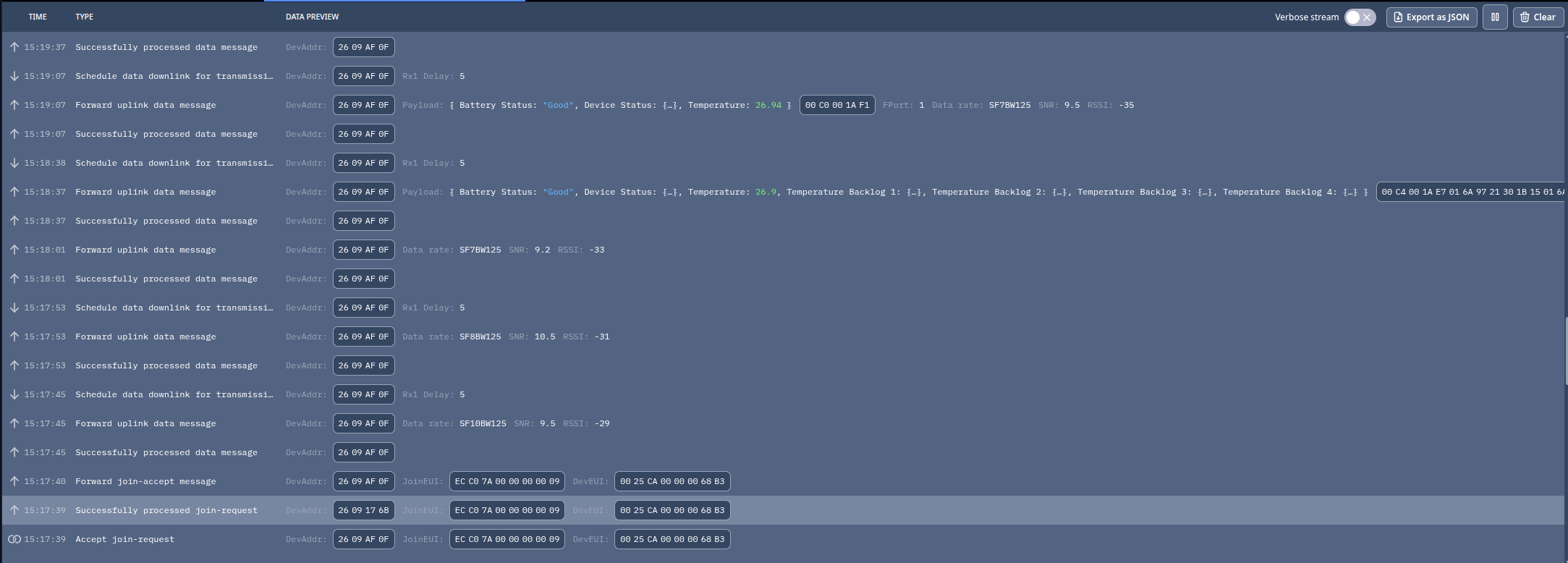
Captured Payload
00 C4 00 1A E7
01 6A 97 21 30 1B 15
01 6A 97 21 4E 1B 15
01 6A 97 21 6C 1B 20
01 6A 97 21 8A 1B 15
Continuous form:
00C4001AE7016A9721301B15016A97214E1B15016A97216C1B20016A97218A1B15The payload is 33 bytes long.
Payload Visualization
Header  Status    Current Reading         Backlog Record #1
  │       │        Tag     Value           Tag    Timestamp     Value
  │       │         │        │              │        │           │
 00      C4        00      1AE7            01     6A972130     1B15

                           Backlog Record #2
                            01  6A97214E  1B15

                           Backlog Record #3
                            01  6A97216C  1B20

                           Backlog Record #4
                            01  6A97218A  1B15
Payload Breakdown
| Byte(s) | Hex | Field | Description | Decoded Value |
|---|---|---|---|---|
| 0 | 00 | Message Header | API Version + Message Identifier | API Version 0, Sensor Data |
| 1 | C4 | Status Byte | Battery + device status | Good battery, Backlog Messages Available |
| 2 | 00 | Tag | Current Temperature | Temperature |
| 3–4 | 1A E7 | Value | Current temperature, Q8 | 26.90 °C |
| 5 | 01 | Tag | Temperature Backlog | Backlog #1 |
| 6–9 | 6A 97 21 30 | Timestamp | UNIX UTC timestamp | 2026-09-01 19:02:08 UTC |
| 10–11 | 1B 15 | Temperature | Q8 temperature | 27.08 °C |
| 12 | 01 | Tag | Temperature Backlog | Backlog #2 |
| 13–16 | 6A 97 21 4E | Timestamp | UNIX UTC timestamp | 2026-09-01 19:02:38 UTC |
| 17–18 | 1B 15 | Temperature | Q8 temperature | 27.08 °C |
| 19 | 01 | Tag | Temperature Backlog | Backlog #3 |
| 20–23 | 6A 97 21 6C | Timestamp | UNIX UTC timestamp | 2026-09-01 19:03:08 UTC |
| 24–25 | 1B 20 | Temperature | Q8 temperature | 27.13 °C |
| 26 | 01 | Tag | Temperature Backlog | Backlog #4 |
| 27–30 | 6A 97 21 8A | Timestamp | UNIX UTC timestamp | 2026-09-01 19:03:38 UTC |
| 31–32 | 1B 15 | Temperature | Q8 temperature | 27.08 °C |
The protocol defines timestamps as unsigned 32-bit UNIX epoch values, while Temperature Backlog consists of the UTC timestamp followed by the corresponding Temperature value.
Value Conversion
Temperature Backlog #1:
Timestamp:
0x6A972130
= 2026-09-01 19:02:08 UTC

Temperature:
0x1B15 = 6933

6933 / 256
= 27.0820 °C
≈ 27.08 °C
Negative Internal Temperature Uplink
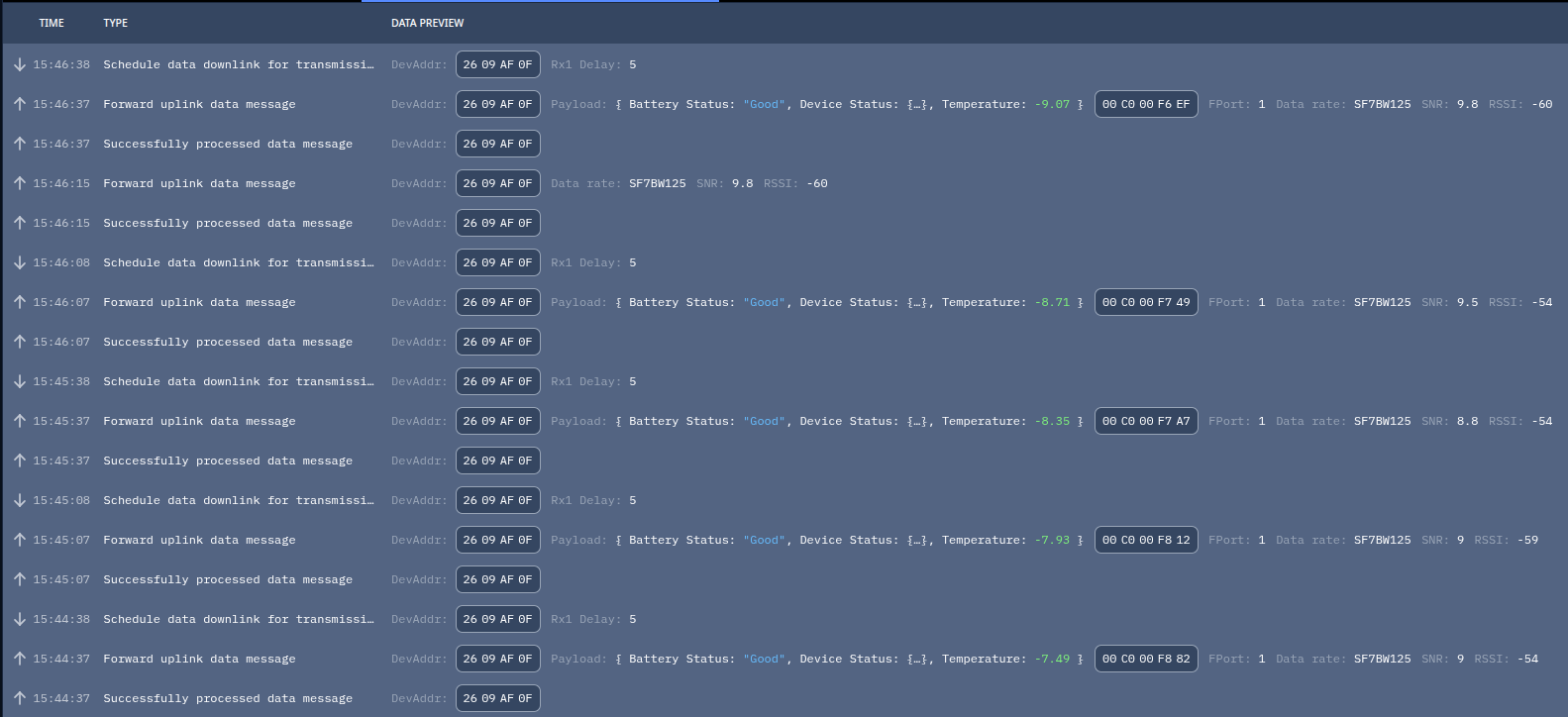
Captured Payload
00 C0 00 F8 12Payload Visualization
00 | C0 | 00 | F8 12
│    │    │      │
│    │    │      └── Temperature = -7.93 °C
│    │    └───────── Tag 0x00 = Temperature
│    └────────────── Status = Good battery, no status flags
└─────────────────── API Version 0, Sensor Data Message
Payload Breakdown
| Byte(s) | Hex | Field | Description | Decoded Value |
|---|---|---|---|---|
| 0 | 00 | Message Header | API Version + Message Identifier | API Version 0, Sensor Data |
| 1 | C0 | Status Byte | Battery + device status | Good battery, no status flags |
| 2 | 00 | Tag | Standard Temperature parameter | Temperature |
| 3–4 | F8 12 | Value | Signed 16-bit Q8 temperature | -7.93 °C |
The standard RS26x Temperature datatype uses a signed two-byte fixed-point value with a scaling factor of 256 (Q8), allowing both positive and negative temperatures to be represented.
Value Conversion
Because the temperature value is signed,0xF812 must first be interpreted as a signed 16-bit integer. Using two's complement:Raw value = 0xF812
Invert bits:
0xF812 → 0x07ED
Add 1:
0x07ED + 1 = 0x07EE
0x07EE = 2030 decimal
Therefore:
Signed value = -2030
-2030 / 256 = -7.93 °CConfiguration Get/Set Overview
The following examples demonstrate how RS26x configuration parameters can be read and modified over LoRaWAN using Configuration Get and Configuration Set downlink messages. The test uses the Aggregation Mode parameter because its effect is easy to verify in subsequent Sensor Data uplinks: normal temperature data uses Tag0x00, while Aggregation mode produces a longer payload using the Aggregated Temperature Tag 0x02. The examples show the raw downlink payload sent from TTI, the Configuration Data response returned by the RS26x, and the resulting change in the sensor uplink payload format.Configuration Get
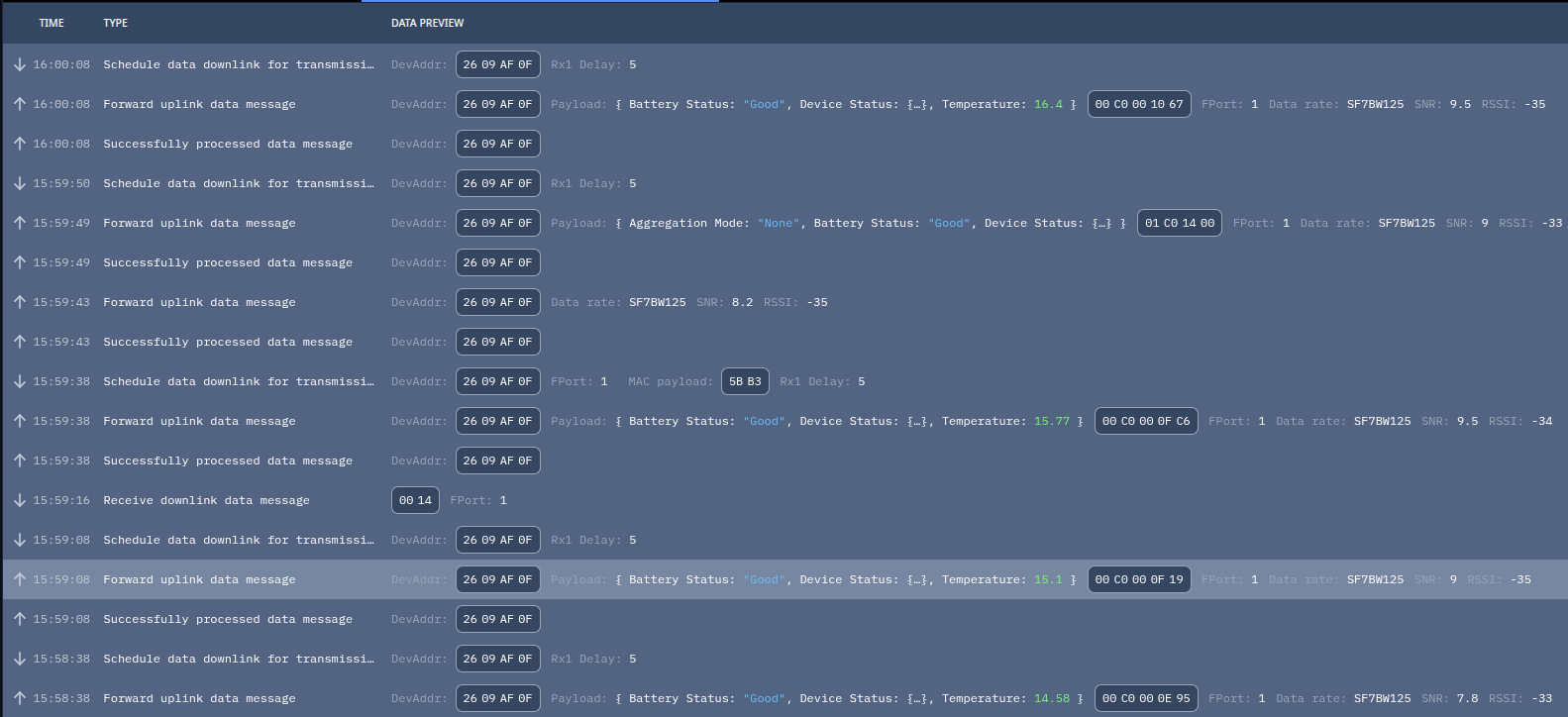
Sent Downlink from TTI:
00 14Payload Visualization
00 | 14
│    │
│    └── Tag 0x14 = Aggregation Mode
└─────── API Version 0, Configuration Get
Configuration Data Response
01 C0 14 00Payload Visualization
01 | C0 | 14 | 00
│    │    │    │
│    │    │    └── Value 0 = None
│    │    └─────── Tag 0x14 = Aggregation Mode
│    └──────────── Status = Good battery, no status flags
└───────────────── API Version 0, Configuration Data
Payload Breakdown
| Byte(s) | Hex | Field | Description | Decoded Value |
|---|---|---|---|---|
| 0 | 01 | Message Header | API Version + Message Identifier | API 0, Configuration Data |
| 1 | C0 | Status Byte | Battery + device status | Good battery |
| 2 | 14 | Tag | Aggregation Mode | Tag 20 decimal / 0x14 |
| 3 | 00 | Value | Aggregation Mode enumeration | None |
0x14 values map to:0x00 = None
0x01 = Aggregation
0x02 = AveragingConfiguration Set – Enable Aggregation Mode
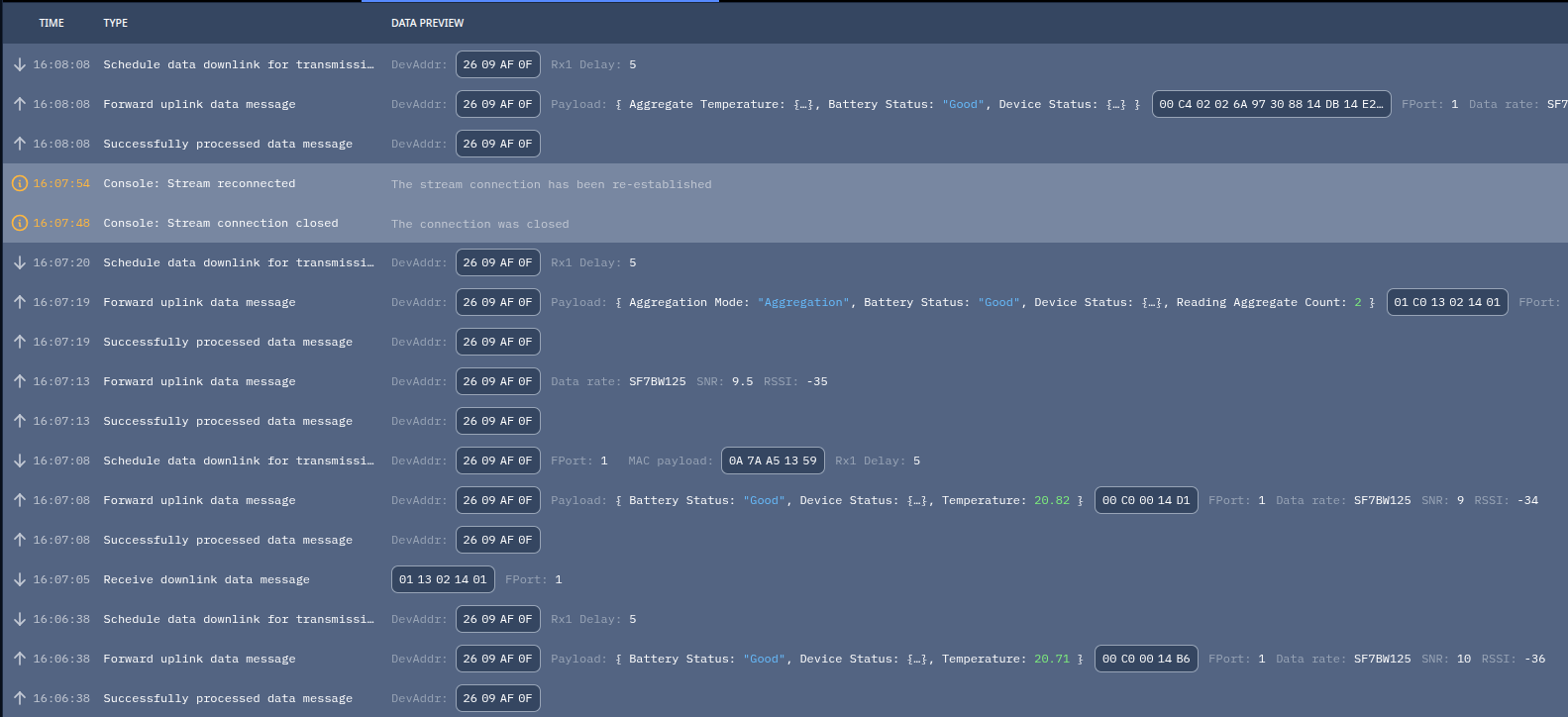
Sent Downlink
01C013021401Payload Visualization
01 | 13 | 02 | 14 | 01
│    │    │    │    │
│    │    │    │    └── Aggregation Mode = Aggregation
│    │    │    └─────── Tag 0x14 = Aggregation Mode
│    │    └──────────── Reading Aggregate Count = 2
│    └───────────────── Tag 0x13 = Reading Aggregate Count
└────────────────────── API Version 0, Configuration Set19 (0x13) and Aggregation Mode as Tag 20 (0x14). Aggregation Mode value 1 represents Aggregation. Configuration Data Response
The RS26x responded with:
01C013021401TTI decoded this as:
Reading Aggregate Count: 2
Aggregation Mode: "Aggregation"
Battery Status: "Good"
Response Visualization
01 | C0 | 13 | 02 | 14 | 01
│    │    │    │    │    │
│    │    │    │    │    └── Aggregation
│    │    │    │    └─────── Aggregation Mode
│    │    │    └──────────── Count = 2
│    │    └───────────────── Reading Aggregate Count
│    └────────────────────── Good battery, no status flags
└─────────────────────────── API Version 0, Configuration Data
The device acknowledges the downlink with a Configuration Data response. Configuration Data uplinks are used by the RS26x as responses to Configuration Get and Configuration Set messages.
Resulting Aggregated Temperature Uplink
Captured uplink payload following configuration update:
00C402026A97308814DB14E20x00 (Standard Temperature) is replaced by Tag 0x02 (Aggregated Temperature) in subsequent uplinks, and two readings are now contained in the same payload.Payload Visualization
00 | C4 | 02 | 02 | 6A973088 | 14DB | 14E2
│    │    │    │        │        │       │
│    │    │    │        │        │       └── Reading #2 = 20.88 °C
│    │    │    │        │        └────────── Reading #1 = 20.86 °C
│    │    │    │        └─────────────────── Timestamp of first reading
│    │    │    └──────────────────────────── Count = 2
│    │    └───────────────────────────────── Tag 0x02 = Aggregated Temperature
│    └────────────────────────────────────── Good battery + Backlog Available
└─────────────────────────────────────────── API Version 0, Sensor Data
Payload Breakdown
| Byte(s) | Hex | Field | Description | Decoded Value |
|---|---|---|---|---|
| 0 | 00 | Message Header | API Version + Message Identifier | API 0, Sensor Data |
| 1 | C4 | Status Byte | Battery + device status | Good battery + Backlog Available |
| 2 | 02 | Tag | Aggregated Temperature | Aggregated temperature data |
| 3 | 02 | Reading Count | Number of readings | 2 |
| 4–7 | 6A 97 30 88 | Timestamp | Timestamp of first reading | 2026-09-01 20:07:36 UTC |
| 8–9 | 14 DB | Temperature #1 | Signed Q8 temperature | 20.86 °C |
| 10–11 | 14 E2 | Temperature #2 | Signed Q8 temperature | 20.88 °C |