/filters:background_color(white)/2025-03/60_2230C_straight.png)
/filters:background_color(white)/s3fs-public/2018-10/60_SiP_straight.png)
/filters:background_color(white)/2024-04/Sona%20TI351%20-%20Family%20%281%29.png)
/filters:background_color(white)/2024-03/Sona%20IF513.png)
/filters:background_color(white)/2024-10/Sona%20IF573%20-%20Family.png)
/filters:background_color(white)/2025-12/Sona%20NX611%20-%20Family.png)
/filters:background_color(white)/2024-10/Sterling-LWB+-Family.png)
/filters:background_color(white)/2024-03/LWB5-Plus-Modules-And-USB1.png)
Introduction
One of the benefits of using a Wi-Fi+Bluetooth radio combo module from Ezurio is the software provided with it. Here in the Ezurio engineering team we refer to this software as the Radio Stack, also referred to as the EZ Connectivity Stack.
Many people, inside and outside Ezurio, refer to the EZ Connectivity Stack as Backports. This isn’t technically correct (backports is only one component of several in the EZ Connectivity Stack), but we don’t care what you call it.
So what is the EZ Connectivity Stack? What does it include? What advantages does the EZ Connectivity Stack provide over using software from other sources such as the silicon vendor or upstream mainline?
What is the EZ Connectivity Stack?
The EZ Connectivity Stack is the complete set of software needed to support the Ezurio Wi-Fi+Bluetooth combo modules in Linux and Android.
It includes the following:
- Backports package with Wi-Fi and Bluetooth in-kernel components
- Radio-specific Firmware packages
- Enhanced wpa_supplicant and hostapd
- Enhanced Network Manager
- Adaptive World Mode framework (not available for all radios)
- Host Integration layers for Yocto and Buildroot
- Tools to support regulatory testing
The EZ Connectivity Stack is supported on the following modules:
- Sterling 60-SIPT — Wi-Fi 5 / Bluetooth 5.1
- Sterling 60-2230C — Wi-Fi 5 / Bluetooth 5.1
- Sterling-LWB+ — Wi-Fi 4 / Bluetooth 5.2
- Sterling-LWB5+ — Wi-Fi 5 / Bluetooth 5.1
- Sona NX611 — Wi-Fi 6 / Bluetooth 5.4
- Sona IF513 — Wi-Fi 6E / Bluetooth Core 6.0
- Sona IF573 — Wi-Fi 6E / Bluetooth Core 6.0
- Sona TI351 — Wi-Fi 6 / Bluetooth 5.4
Radio family-specific instructions can be found in the Software Integration Guides:
- Sona IF and Sterling-LWBx: https://www.ezurio.com/documentation/sona-if-and-sterling-lwbx-software-integration-guide
- Sona TI: https://www.ezurio.com/documentation/software-integration-guide-sona-ti351
- Sterling-60: https://www.ezurio.com/documentation/software-integration-guide-sterling-60
We generally release the EZ Connectivity Stack twice a year. Each release contains the latest silicon vendor updates available at the time of release as well as the latest kernel updates and other fixes that have accumulated since the previous release.
Ezurio has SOMs too, and we use the same EZ Connectivity Stack Release in our SOM software packages. The EZ Connectivity Stack is relevant whether you are using an Ezurio SOM with an Ezurio Wi-Fi+BT radio module, or if you are using an Ezurio Wi-Fi+BT radio module on your own hardware.
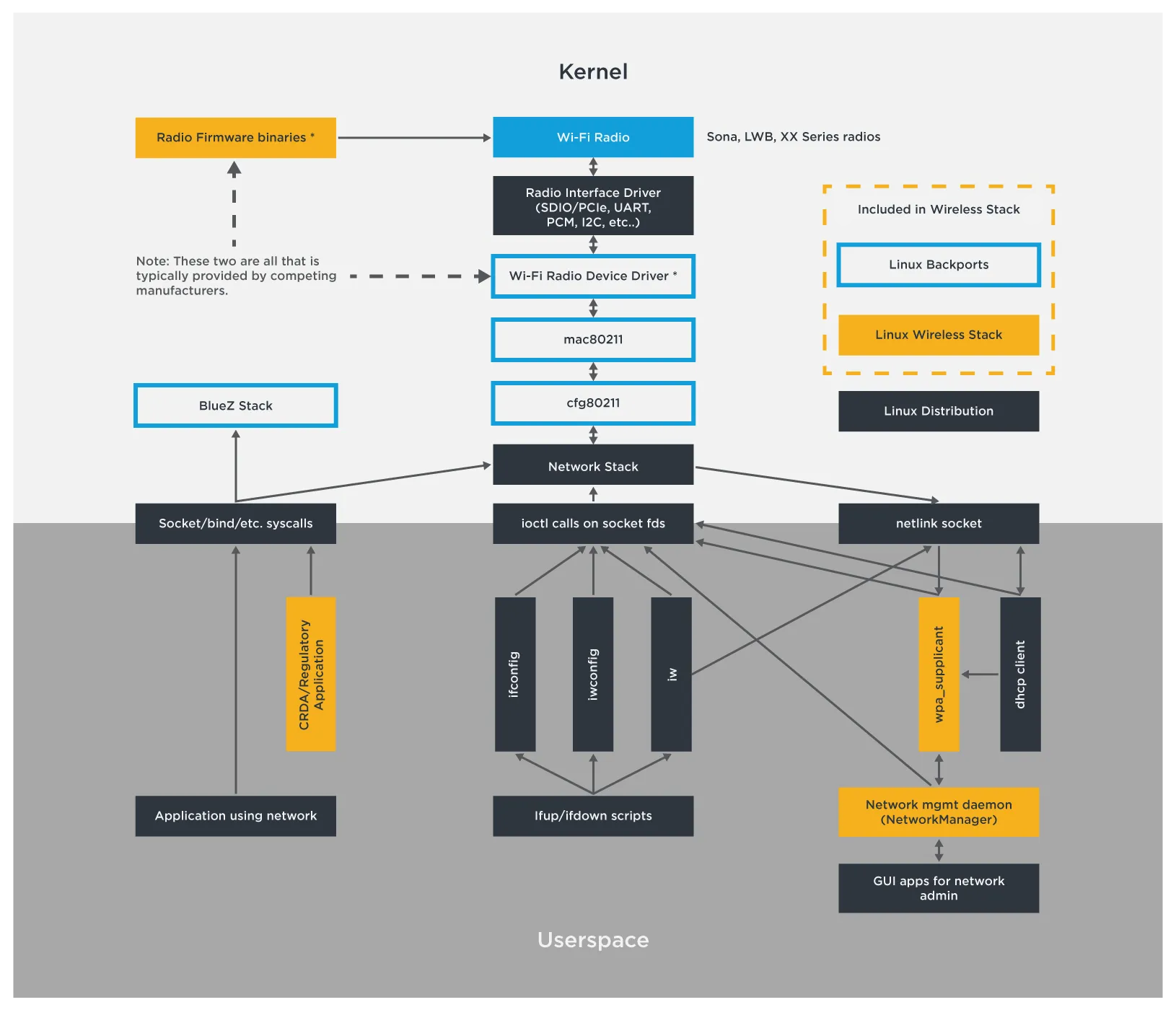
Stack Components
Given that this is Linux and most of the components above are publicly available from upstream “mainline” sources, why should you use the EZ Connectivity Stack? Isn’t it better to use mainline?
Probably not. Let’s talk about each of these components, and the benefits of using the EZ Connectivity Stack with Ezurio radio modules.
Backports
The EZ Connectivity Stack includes a customized version of the upstream “backports” project to deliver the in-kernel drivers. This includes the Wi-Fi and Bluetooth client drivers, core Wi-Fi components such as cfg80211 and mac80211, and core Bluetooth components. These components come from a fork of the latest LTS kernel maintained by Ezurio.
Support for a wide range of kernel versions
Backports allows us to easily support the latest Wi-Fi+BT drivers on older kernels. It doesn’t matter what kernel version you have, you can be confident the in-kernel components in the EZ Connectivity Stack are coming from the latest LTS kernel maintained by Ezurio. This means you get the latest bug fixes, security fixes and features from upstream even if you are using an older kernel.
Kernel interfaces change all the time. Porting a driver based on one kernel version to another kernel version can be very difficult, and requires expertise in both the kernel and in the specific driver being ported. With the backports infrastructure provided by the EZ Connectivity Stack, that complication goes away. The backports infrastructure handles all the complexity of kernel interface differences.
See the table below for official kernel support across our radio products. Kernels between these versions are also supported. Earlier versions as far back as v2.6 are possible on some radios.
| v4.1 | v4.14 | v4.19 | v5.10 | v5.15 | v6.1 | v6.6 | v6.12 | |
|---|---|---|---|---|---|---|---|---|
| LWB | x | x | x | x | x | x | x | x |
| LWB5 | x | x | x | x | x | x | x | |
| LWB+ | x | x | x | x | x | x | x | x |
| LWB5+ | x | x | x | x | x | x | x | x |
| 60 Series | x | x | x | x | x | x | x | x |
| IF573 | x | x | x | x | x | x | x | x |
| IF513 | x | x | x | x | x | x | x | x |
| NX611 | x | x | x | x | x | x | x | |
| TI351 | x | x | x | x | x | x | x |
Silicon vendor patches already included - and on the latest kernels!
The fact that the Ezurio backports package is based on the Ezurio fork of the latest upstream LTS kernel provides many benefits. You get the latest wireless feature support and bug fixes in the kernel, even if you are using an older kernel on your host. We maintain the Ezurio kernel with the latest patches and out-of-tree drivers from our silicon vendor partners. For some radios this can include literally hundreds of patches. While it would be great if they were pushed to the upstream mainline kernel, the reality is they generally aren’t. EZ Connectivity Stack users get these patches automatically.
Our silicon vendor partners often do their development on much older kernels. When we bring those patches in, we do the work of forward porting them to our latest LTS kernel fork. We create the backports package using this patched LTS kernel. This often allows EZ Connectivity Stack users to use kernel versions that are newer than the version supported by the silicon vendor. The process works in reverse too. Since we deliver our code using backports, a project based on a kernel version older than the one the silicon vendor supports has no problem. It just works.
Easy kernel updates and access to support
Decide to upgrade your kernel to a later version? No problem. Since the EZ Connectivity Stack delivers in-kernel components via backports, it just works. You don’t need to factor in time to port all the radio software forward during the upgrade, and you don’t need to be a Wi-Fi driver expert to do it.
Have issues with one of the drivers? When you use the EZ Connectivity Stack with the backports package, you’re using the same drivers we are. That lets us support you because we know exactly what code is running on your device.
Firmware
The EZ Connectivity Stack includes all the firmware and other configuration files required by the Wi-Fi+BT radio modules. It is critical to use the firmware files from the EZ Connectivity Stack as some of them are specifically configured for operation on the Ezurio modules. This includes the power configuration required for regulatory compliance.
Firmware is made available via our Backports or Yocto integration layers.
wpa_supplicant/hostapd
The EZ Connectivity Stack includes enhanced versions of the wpa_supplicant and hostapd. The supplicant is the user-space daemon responsible for managing authentication and association on wireless networks. On some radios it also handles roaming. We have enhanced the supplicant to support additional AP features that extend beyond those included upstream. This allows most AP interfaces to be managed via Network Manager, but hostapd is still included for those who prefer it. Our supplicant source is also updated to address known CVE vulnerabilities.
Ezurio ships source for these components in the EZ Connectivity Stack. The Ezurio supplicant is a fork of the upstream wpa_supplicant/hostapd project and maintains synchronization with it. Ezurio developers have decades of experience in this space, and we’ve used that experience to enhance the supplicant with features, performance improvements and bug fixes that are not available in the upstream supplicant. Some radios require supplicant enhancements for proper operation - these are not available upstream, but they are included in the Ezurio supplicant.
Network Manager
The EZ Connectivity Stack includes an enhanced version of Network Manager. This user-space daemon automates the setup and management of network connections, handling much of the complexity and networking expertise that would otherwise be needed.
Ezurio ships source for Network Manager in the EZ Connectivity Stack. It is a fork of the upstream Network Manager project with enhancements focused on wireless configuration. Network Manager interfaces to the supplicant in the background. Ezurio has enhanced the interface to make more of the supplicant feature set available. This allows finer control of the wireless network configuration.
For general information about upstream NetworkManager, visit: https://networkmanager.dev/docs/api/latest/
Ezurio NetworkManager Enhancements
The following is a summary of Ezurio-specific commands and enhancements above the upstream NetworkManager.
For full documentaion on Ezurio NetworkManager, please see the Summit Software User Guide.
802-1x Properties
Supports configuration of phase 2 authentication (phase2-auth and phase2-autheap), both of which accept multiple authentication methods. Phase 1 authentication flags (phase1-auth-flags) allow control over TLS version enforcement, time/date certificate checks, and safe renegotiation behavior. A PAC file password field is available for decrypting manually provisioned EAP-FAST PAC files (requires Summit supplicant).802-11-Wireless Properties
auth-timeout— Restarts association if authentication doesn't complete in time (Summit supplicant required).frequency-list— Restricts scanning to specific frequencies, applied during both connected and disconnected states.ccx— Enables Cisco CCX features at varying levels of support (Summit supplicant required).client-name— Sends a device identifier to CCX-capable APs when CCX is enabled (Summit supplicant required).acs— Auto Channel Selection for AP mode, with support for Summit ACS and Survey-Based ACS (Summit supplicant required).dms— Directed Multicast Service, configurable for IPv4 or IPv6, activated only when AP advertises support (Summit supplicant required).ap-config-file— Specifies a hostapd configuration template for 802.1x AP modes (Summit supplicant required).summit-flags— Summit-specific feature flags, including MFP deauthentication before roaming (Summit supplicant required).
802-11-Wireless-Security Properties
proto— Supports WPA3 as an authentication protocol (must be used exclusively; Summit supplicant required).key-mgmt— Extended to include CCKM as a key management method (Summit supplicant required).pairwise— Extended to support additional ciphers:ccmp-256,gcmp, andgcmp-256(Summit supplicant required).proactive-key-caching— Selects between normal/SPMK and OPMK PMK caching modes; defaults to enabled for EAP-based and CCKM connections.ft— Configures Fast Transition (802.11r) as disabled, optional, or required.owe-only— Controls whether Opportunistic Wireless Encryption (OWE) connections are enforced in OWE-only mode.
wpa-eap-suite-b and wpa-eap-suite-b-192, group management ciphers are set automatically and cannot be manually overridden. WPA3 has specific restrictions on allowed modes, ciphers, and key management methods.Scanning
hidden— Modifies scanning behavior; suppresses broadcast probe requests when all profiles are marked hidden.max-scan-interval— Limits the NetworkManager scan interval (range: 3–120 seconds when non-zero).bgscan— Controls background scanning while connected, using configurable signal thresholds and short/long intervals.
60 Series radio and Summit supplicant unlock additional fine-grained scan timing controls:
scan-delay— Delay before transmitting a probe request on a new channel (active scanning).scan-dwell— Time to wait for probe responses after a probe request (active scanning).scan-passive-dwell— Listen duration per channel for passive scanning.scan-suspend-time— Duration to pause background scanning to service the active connection.frequency-dfs— Enables or disables DFS/Radar frequencies.scan-roam-delta— Sets the minimum signal improvement (dB) required to trigger a roam.
NetworkManager.conf Options
wifi.scan-avoid-bcast-ssid— Prevents broadcast probe requests during scanning, reducing BSSID processing overhead in busy environments.wifi.disable-periodic-scan— Stops periodic scans when the interface is disconnected or failed, useful in AP+STA configurations sharing a radio.
Adaptive World Mode
The EZ Connectivity Stack includes the components needed to support our Adaptive World Mode (AWM) feature on supported radios. A device containing a wireless radio must be factory configured for operation in the country where it is sold, and can’t have any configuration mechanism that could allow it to operate outside of the approved limits. Typically this means you need separate, unique SKUs for shipment to each supported country or region, or use a configuration that is valid everywhere but will have limited channel support and reduced performance.
Ezurio’s Adaptive World Mode on supported radios solves this problem by monitoring all the APs in view and analyzing that data to determine where in the world it is. If it can confidently make that determination, it automatically switches to the optimized configuration for that country. This is all done in real-time and continuously monitored using algorithms that have been approved by the regulatory bodies.
Host Integration
All of this software is no good unless it is integrated into the host platform. Ezurio provides integration layers for Yocto and Buildroot to handle much of this for you. These are the same layers we use to add radio support to our SOMs so they are well-tested.
The commonality across the EZ Connectivity Stack lets you move between Ezurio radio products with ease. Differences between radios are contained within the backports and firmware packages. All you need to do is select a different radio in the host integration layer - everything else remains the same.
We refer our customers to our extensive documentation, especially the Software Integration guides available online for our radios. The Software Integration guides are written by members of the engineering team, so they have the content we think is important for you to know. When integration related questions come in via support, we often point back to the Software Integration guides where the answers usually already exist. Don’t miss it!
Yocto Integration
- Sona IF and Sterling-LWBx: https://www.ezurio.com/documentation/sona-if-and-sterling-lwbx-software-integration-guide#section-27
- Sona TI: https://www.ezurio.com/documentation/software-integration-guide-sona-ti351#section-22
Buildroot Integration
- Sona IF and Sterling-LWBx: https://www.ezurio.com/documentation/sona-if-and-sterling-lwbx-software-integration-guide#section-28
- Sona TI: https://www.ezurio.com/documentation/software-integration-guide-sona-ti351#section-23
Regulatory Utilities
Regulatory compliance and emissions testing require the radio to be put into special test modes. Ezurio provides the test firmware and our own regulatory utility needed for this testing. The regulatory utilities are radio family specific, but all share a common implementation. Ezurio’s regulatory utility avoids the complexity that often comes with the tools from the silicon vendor and eliminates common sources of error. The regulatory utility, along with user manuals and documentation, simplifies the regulatory test process.
These utilities aren’t publicly available - contact Ezurio to get them.
Regulatory Utility operation is addressed in the Regulatory Utility Guides:
- Sona IF and Sterling-LWBx: https://www.ezurio.com/documentation/sona-if-and-sterling-lwbx-regulatory-utility
- Sona TI: https://www.ezurio.com/documentation/user-guide-sona-ti-regulatory-utility
Software Quality Assurance
Every EZ Connectivity Stack release goes through a structured quality assurance (QA) process before it is made available to customers. Our QA process is designed to ensure the stability, performance, and regulatory compliance of each software component included in the stack.
This process includes:
- Automated and manual validation testing on the release kernel version and target platforms
- Regression testing to detect and resolve issues introduced by new features, silicon vendor patches, or kernel changes
- Interoperability testing conducted with Cisco access points & enterprise environments, complemented by extensive security evaluations aligned with key Wi-Fi Alliance (WFA) requirements, including execution of the WFA provided vulnerability assessments, such as those targeting the KRACK and Fragment-and-Forge vulnerabilities.
- Compliance verification to ensure all changes meet applicable regulatory and certification requirements
- Performance benchmarking including roam behavior, throughput, and connection stability
These tests are executed on Ezurio SOM hardware, so the same EZ Connectivity Stack delivered to customers is deployed internally at Ezurio. This gives us direct operational feedback and an opportunity to catch real-world issues early.
Thanks to this rigorous QA process, customers can adopt new EZ Connectivity Stack releases with confidence, knowing they’ve been tested under realistic conditions and with the specific needs of Ezurio Wi-Fi+BT modules in mind.
Final Thoughts
The EZ Connectivity Stack has all the software needed to support Ezurio Wi-Fi+BT radio modules and is a key part of the Ezurio wireless solution. It is based on the latest LTS Linux kernel, has all the collateral from our silicon vendor partners, and can be used directly on a wide range of supported host kernels with no wireless expertise needed.
The EZ Connectivity Stack contains enhanced versions of the supplicant and Network Manager to provide additional wireless configuration support, enhanced performance and fixes based on our decades of wireless experience. It also contains our Adaptive World Mode architecture for supported radios, greatly simplifying your SKU and supply chain management.
The EZ Connectivity Stack is what we use internally here at Ezurio for our SOMs, which contain these same radios. We are using and testing the same thing we provide to you, on our own boards.
Using an Ezurio Wi-Fi+BT radio module? Visit the product page for your product on Ezurio.com and check out the Software Integration guide for your radio. Use the Yocto or Buildroot integration layers to bring in the EZ Connectivity Stack.
Let us know if you have any questions, and thanks for trusting Ezurio, Your Connectivity Expert!