/filters:background_color(white)/2025-02/Nitrogen%2093%20NX611%20front-1port.png)
/filters:background_color(white)/2025-05/SOM%20DVK%20HMI%20Camera.png)
Getting Started
Welcome to the Quick Start Guide (QSG) for Ezurio's Nitrogen93 SMARC Evaluation Kit: https://www.ezurio.com/n93-evk🔗. This guide will walk you through the initial setup process and introduce you to the key hardware and software components of the kit. It's designed to help you quickly get up and running, understand what's included, and start exploring the platform. If you encounter any issues or have questions, please visit https://www.ezurio.com/support🔗 or contact us at support@ezurio.com. As always, let us know about your experience with the EVK — both the good and bad.
Please refer to http://ezurio.com/n95-evk🔗 if you purchased a Nitrogen95 Evaluation Kit instead.
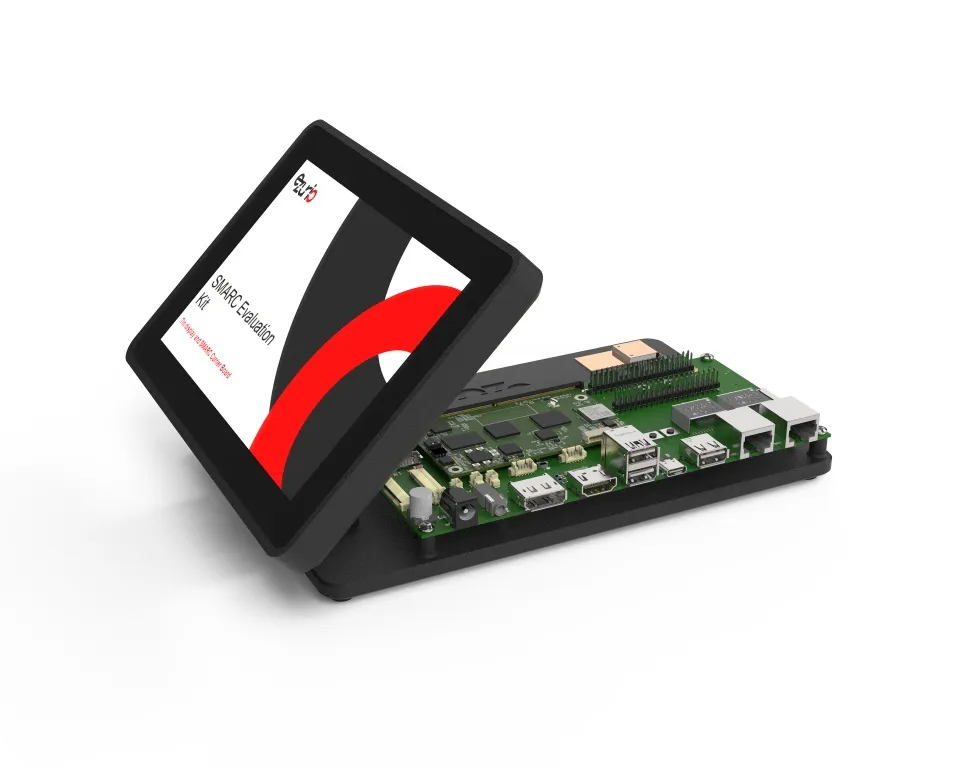
EZSMI-935-0216-00158-2-K2 (Nitrogen93 SMARC Evaluation Kit),
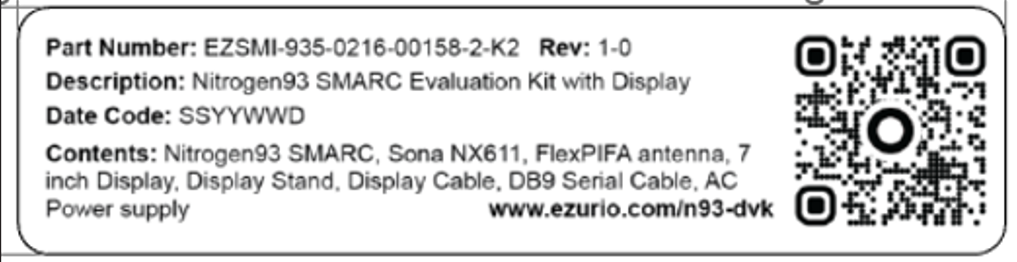
Example of the box label for the Nitrogen93 SMARC Evaluation Kit.
Label will vary based on chosen kit part number.
Unboxing
The following table provides a breakdown of the hardware components included in the Nitrogen93 SMARC Evaluation Kit:
| Item | Additional Description & Details | |
|---|---|---|
| 1 | 1× Nitrogen93 SMARC Module REV30 | #EZSMI-935-0216-00158-2-K2. Equipped with 2 GB RAM and 16 GB eMMC storage. Sona NX611M variant (#453-00118), M.2 1216 form factor, featuring integrated Wi-Fi 6 and Bluetooth 5.4 connectivity. |
| 2 | 1× Universal SMARC Carrier Board REV20 | #SMARC_CAR, development board for all SMARC modules and solutions by Ezurio. |
| 3 | 1× 5V/4A 100–240 VAC Switching Power Supply | #FY0504000, includes region-specific AC power cord. |
| 4 | 1× Dual DB9 Serial Cable | Provides terminal and debug access for both Cortex-A and Cortex-M cores. |
| 5 | 1× 7" Touchscreen Display | #BD070LIC3 (MIPI version) with 33-pin FPC (0.5 mm pitch, 203 mm length) flex cable. |
| 6 | 1× 2.4/5/6 GHz FlexPIFA Antenna | #EFB2471A3S-10MH4L with 10 cm cable. |
| 7 | 1× Enclosure with Desktop Stand | Black enclosure with integrated stand. |
Note: All accessories listed above are included unless otherwise stated.
Datasheets, Product Pages & DOCs
The following table provides an overview of available datasheets, product pages, and documentation (DOCs).
| Product | Datasheet | Product Page (+Buy) | Documentation | |
|---|---|---|---|---|
| 1 | Enclosure with Desktop Stand | N/A | N/A | N/A |
| 2 | Nitrogen93 SMARC Module | Link🔗 | Link🔗 | Link🔗 |
| 3 | Universal SMARC Carrier Board | Link🔗 | Link🔗 | Link🔗 |
| 4 | Sona NX611 Wi-Fi 6 + BLE 5.4 Module | Link🔗 | Link🔗 | Link🔗 |
| 5 | BD070LIC3 – 7″ Touchscreen Display | See documentation. | Link🔗 | Link🔗 |
| 6 | 2.4/5/6 GHz FlexPIFA Antenna | Link🔗 | Link🔗 | Link🔗 |
The latest product brief for the Nitrogen93 SMARC Evaluation Kit can be found here🔗.
Board Assembly
Always make sure everything is completely powered off and disconnected from any power source before making changes to the board. Doing so while the board — or other parts of it — are still powered can cause irreversible damage to the hardware equipment!
DSI0) using a 33-pin FPC/FFC ribbon cable. By default, the antenna is glued to the stand for convenience and stability.U9 and the MHF4L connector on the PCB of the Sona NX611 module. We do not recommend removing the heatsink, but if necessary, it can be done using a 3 mm hex socket bit. First Boot
The system ships with the Yocto Walnascar 6.16.0.27 Weston release pre-installed on the eMMC (as of the time of this writing). The example below shows the output from the bootlog. You can use this as a reference to verify or compare the output from your own board.
Boot Log
U-Boot SPL 2025.10-13.134.0.25 (May 22 2026 - 06:26:01 +0000)
Normal Boot
Trying to boot from MMC1
Primary set selected
Load image from MMC/SD 0xcd400
NOTICE:  BL31: v2.12.0(release):lf-6.12.49-2.2.0
NOTICE:  BL31: Built : 10:13:07, Oct 17 2025

U-Boot 2025.10-13.134.0.25 (May 22 2026 - 06:26:01 +0000)

CPU:   NXP i.MX93 Rev2.0 A55 at 1800 MHz
Model: Ezurio i.MX93 Nitrogen SMARC board
DRAM:  7.8 GiB
Core:  259 devices, 21 uclasses, devicetree: separate
MMC:   FSL_SDHC: 0, FSL_SDHC: 1
Loading Environment from MMC... Reading from MMC(0)... OK
In:    serial@44380000
Out:   serial@44380000
Err:   serial@44380000

BuildInfo:
  - ELE firmware version 2.0.4-9ca4d997

Booting from eMMC, side a
2560 bytes read in 0 ms
## Executing script at 90400000
sha256,rsa2048:dev+ sha256+ 6169600 bytes read in 23 ms (255.8 MiB/s)
## Loading kernel (any) from FIT Image at 90400000 ...
   Using 'conf-nitrogen-imx93-smarc-dvk.dtb' configuration
   Verifying Hash Integrity ... sha256,rsa2048:dev+ OK
   Trying 'kernel-1' kernel subimage
   Verifying Hash Integrity ... sha256+ OK
## Loading fdt (any) from FIT Image at 90400000 ...
   Using 'conf-nitrogen-imx93-smarc-dvk.dtb' configuration
   Verifying Hash Integrity ... sha256,rsa2048:dev+ OK
   Trying 'fdt-nitrogen-imx93-smarc-dvk.dtb' fdt subimage
   Verifying Hash Integrity ... sha256+ OK
   Loading fdt from 0x909b9600 to 0x95000000
   Booting using the fdt blob at 0x95000000
   Uncompressing Kernel Image to 92000000
   Loading Device Tree to 00000000fcf5f000, end 00000000fcf7921f ... OK

Starting kernel ...


Summit SOM imx93-nitrogen-smarc image-summitsom-weston 6.16.0.27 summit ttyLP0
summit login:
Login Credentials:
Username: root
Password: summit
First Boot Hardware Configuration
See the EZ BSP User Guide for Nitrogen93 SMARC:
https://www.ezurio.com/documentation/user-guide-ez-bsp-for-nitrogen93-smarc
“Hello World”
Once the Universal SMARC Carrier Board is powered throughJ17using the DC barrel jack and the included power supply, the touchscreen display will initialize automatically. A green power indicator LED (D9) will illuminate; however, it may not be visible if the screen is folded down.Within a few seconds, the screen will display our Ezurio "IO" boot / loading animation. The system typically completes the boot process in under 20 seconds, after which the Weston desktop with an Ezurio logo as the background will appear.
Terminal and Debug Access
Cortex-A (CPU)
To set up and establish a serial connection, use the console cable provided in the kit. Connect the DB9 connector to the 6-pin Molex 53398-0671 header on the Universal SMARC Carrier Board (J18, SERIAL) — you may need to gently lift the screen for better access — and attach other end labeled CONSOLE to your host PC through an 5V USB-to-Serial adapter (not included by default); in our example, we used the Tripp Lite USA-19HS (Keyspan): https://tripplite.eaton.com/keyspan-high-speed-usb-to-serial-adapter~USA19HS🔗.Windows users can choose from terminal applications such as TeraTerm🔗, RealTerm🔗, or PuTTY🔗, while Linux users should use tools like screen or picocom. The default serial settings are 115200 baud, 8 data bits, no parity, and 1 stop bit — commonly referred to as 8N1@115200. Once everything is in place, press the RESET button (SW1), and you should see the system boot logs appear in your terminal window.fastboot instead, then you may also want to connect a USB-C cable to J25 and your PC. In this context, please note that powering the entire board and setup through the USB-C connection is not sufficient, as it exceeds the current limits of a standard USB port.Remote Network Login via SSH and Ethernet 1 /2
To connect the Nitrogen93 SMARC EVK to your local or public network, plug an RJ45 Ethernet cable into eitherJ31 or J32 on the Universal SMARC Carrier Board. 100/1000 Mbps connections are supported on these two ports; 10 Gbps not. An SSH server (Dropbear) is enabled by default and listens on port 22 for incoming connections in the background. It becomes active once the system has fully booted.Ensure that a DHCP Server is running on your network. By default, the EVK operates as a DHCP Client, automatically requesting and receiving IPv4 + IPv6 addresses through NetworkManager once available, as shown in the ip example below:# ip a
1: lo: <LOOPBACK,UP,LOWER_UP> mtu 65536 qdisc noqueue state UNKNOWN group default qlen 1000
link/loopback 00:00:00:00:00:00 brd 00:00:00:00:00:00
inet 127.0.0.1/8 scope host lo
valid_lft forever preferred_lft forever
inet6 ::1/128 scope host noprefixroute
valid_lft forever preferred_lft forever
2: can0: <NOARP,ECHO> mtu 16 qdisc noop state DOWN group default qlen 10
link/can
3: can1: <NOARP,ECHO> mtu 16 qdisc noop state DOWN group default qlen 10
link/can
4: eth0: <BROADCAST,MULTICAST,UP,LOWER_UP> mtu 1500 qdisc mq state UP group default qlen 1000
link/ether ec:40:00:0f:00:19 brd ff:ff:ff:ff:ff:ff
inet 192.168.29.195/24 brd 192.168.29.255 scope global dynamic noprefixroute eth0
valid_lft 82498sec preferred_lft 82498sec
inet6 fe80::8d98:7d80:fcb6:2265/64 scope link noprefixroute
valid_lft forever preferred_lft forever
5: eth1: <NO-CARRIER,BROADCAST,MULTICAST,UP> mtu 1500 qdisc mq state DOWN group default qlen 1000
link/ether ec:40:00:0f:00:1c brd ff:ff:ff:ff:ff:ff
6: wlan0: <NO-CARRIER,BROADCAST,MULTICAST,UP> mtu 1500 qdisc mq state DOWN group default qlen 1000
link/ether e8:cb:f5:20:8a:32 brd ff:ff:ff:ff:ff:ff
7: uap0: <NO-CARRIER,BROADCAST,MULTICAST,UP> mtu 1500 qdisc mq state DOWN group default qlen 1000
link/ether ea:cb:f5:20:8b:32 brd ff:ff:ff:ff:ff:ff
8: wfd0: <NO-CARRIER,BROADCAST,MULTICAST,UP> mtu 1500 qdisc mq state DOWN group default qlen 1000
link/ether ea:cb:f5:20:8a:32 brd ff:ff:ff:ff:ff:ff
9: usb0: <NO-CARRIER,BROADCAST,MULTICAST,UP> mtu 1500 qdisc pfifo_fast state DOWN group default qlen 1000
link/ether de:ad:be:ef:00:00 brd ff:ff:ff:ff:ff:ffSystem Processes and Services
The following processes and services were captured and are automatically launched on the system at startup after a fresh boot:
# ps aux
PID   USER     TIME  COMMAND
    1 root      0:02 {systemd} /usr/sbin/init
    2 root      0:00 [kthreadd]
    3 root      0:00 [pool_workqueue_]
    4 root      0:00 [kworker/R-kvfre]
    5 root      0:00 [kworker/R-rcu_g]
    6 root      0:00 [kworker/R-sync_]
    7 root      0:00 [kworker/R-slub_]
    8 root      0:00 [kworker/R-netns]
   11 root      0:01 [kworker/0:1-eve]
   13 root      0:00 [kworker/R-mm_pe]
   14 root      0:00 [rcu_tasks_kthre]
   15 root      0:00 [rcu_tasks_trace]
   16 root      0:00 [ksoftirqd/0]
   17 root      0:00 [rcu_preempt]
   18 root      0:00 [rcu_exp_par_gp_]
   19 root      0:00 [rcu_exp_gp_kthr]
   20 root      0:00 [migration/0]
   21 root      0:00 [cpuhp/0]
   22 root      0:00 [cpuhp/1]
   23 root      0:00 [migration/1]
   24 root      0:00 [ksoftirqd/1]
   27 root      0:00 [cpuhp/2]
   28 root      0:00 [migration/2]
   29 root      0:00 [ksoftirqd/2]
   30 root      0:00 [kworker/2:0-eve]
   31 root      0:00 [kworker/2:0H-kb]
   32 root      0:00 [cpuhp/3]
   33 root      0:00 [migration/3]
   34 root      0:00 [ksoftirqd/3]
   37 root      0:00 [cpuhp/4]
   38 root      0:00 [migration/4]
   39 root      0:00 [ksoftirqd/4]
   40 root      0:00 [kworker/4:0-mm_]
   42 root      0:00 [cpuhp/5]
   43 root      0:00 [migration/5]
   44 root      0:00 [ksoftirqd/5]
   47 root      0:00 [kdevtmpfs]
   48 root      0:00 [kworker/R-inet_]
   49 root      0:00 [oom_reaper]
   50 root      0:00 [kworker/R-write]
   51 root      0:00 [kcompactd0]
   52 root      0:00 [ksmd]
   53 root      0:00 [khugepaged]
   54 root      0:00 [kworker/R-kbloc]
   61 root      0:00 [kworker/R-edac-]
   62 root      0:00 [kworker/R-devfr]
   63 root      0:00 [watchdogd]
   66 root      0:00 [kswapd0]
   67 root      0:00 [irq/22-arm-smmu]
   68 root      0:00 [irq/23-arm-smmu]
   69 root      0:00 [kworker/R-dm_bu]
   70 root      0:00 [sugov:0]
   73 root      0:00 [hwrng]
   74 root      0:00 [kpktgend_0]
   75 root      0:00 [kpktgend_1]
   76 root      0:00 [kpktgend_2]
   77 root      0:00 [kpktgend_3]
   78 root      0:00 [kpktgend_4]
   79 root      0:00 [kpktgend_5]
   80 root      0:00 [kworker/R-mld]
   81 root      0:00 [kworker/1:1H-kb]
   82 root      0:00 [kworker/R-ipv6_]
   83 root      0:00 [kworker/u25:0-M]
   85 root      0:00 [kworker/3:3-pm]
   90 root      0:00 [kworker/3:8-mm_]
   93 root      0:00 [spi0]
   94 root      0:00 [kworker/R-sdhci]
   95 root      0:00 [irq/224-mmc0]
   96 root      0:00 [kworker/R-sdhci]
   97 root      0:00 [irq/225-mmc1]
   98 root      0:00 [irq/226-6-0022]
  104 root      0:00 [kworker/R-sdhci]
  105 root      0:00 [irq/229-mmc2]
  106 root      0:00 [irq/230-rv3028]
  107 root      0:00 [irq/232-4286000]
  108 root      0:00 [kworker/R-mmc_c]
  109 root      0:00 [kworker/0:1H-mm]
  110 root      0:00 [kworker/R-mmc_c]
  111 root      0:00 [irq/231-tusb320]
  117 root      0:00 [irq/233-rv3028]
  118 root      0:00 [irq/222-4b0d000]
  119 root      0:00 [card0-crtc0]
  120 root      0:00 [card0-crtc1]
  121 root      0:00 [kworker/R-kdmfl]
  122 root      0:00 [kworker/R-kveri]
  123 root      0:00 [kworker/2:1H-kv]
  139 root      0:00 [kworker/5:1-pm]
  146 root      0:00 [kworker/5:1H-kb]
  147 root      0:00 [jbd2/mmcblk0p3-]
  148 root      0:00 [kworker/R-ext4-]
  175 root      0:00 [jbd2/mmcblk0p7-]
  176 root      0:00 [kworker/R-ext4-]
  185 root      0:00 [kworker/3:1H-kb]
  200 root      0:00 /usr/lib/systemd/systemd-journald
  220 root      0:00 [kworker/0:2-cgr]
  237 root      0:00 /usr/lib/systemd/systemd-udevd
  278 root      0:00 [kworker/3:2H-kb]
  321 root      0:00 [irq/250-4c01001]
  322 root      0:00 [kworker/R-cfg80]
  323 root      0:00 [irq/249-gt911]
  338 root      0:00 [kworker/R-MOAL_]
  339 root      0:00 [kworker/R-free_]
  340 root      0:00 [mali-simple-pow]
  342 root      0:00 [kworker/R-MOAL_]
  343 root      0:00 [kworker/R-MOAL_]
  344 root      0:00 [kworker/R-MOAL_]
  345 root      0:00 [kworker/R-MOAL_]
  346 root      0:00 [woal_reassoc_se]
  350 root      0:00 [irq/258-vpu_irq]
  353 root      0:00 [kworker/5:2-eve]
  360 root      0:00 [jbd2/mmcblk1p6-]
  361 root      0:00 [kworker/R-ext4-]
  363 root      0:00 [irq/260-ci_imx_]
  369 root      0:00 [kworker/R-ci_ot]
  370 root      0:00 [jbd2/mmcblk1p3-]
  371 root      0:00 [kworker/R-ext4-]
  386 root      0:00 [kworker/R-enetc]
  389 teesuppl  0:00 /usr/sbin/tee-supplicant
  406 root      0:00 [kworker/R-enetc]
  410 root      0:00 [kworker/u25:2-M]
  411 root      0:00 [kworker/4:2H-kb]
  416 root      0:00 [kworker/R-CSAwl]
  418 root      0:00 [kworker/R-MCLIS]
  419 root      0:00 [kworker/R-CSAua]
  420 root      0:00 [kworker/R-MCLIS]
  421 root      0:00 [kworker/R-CSAwf]
  422 root      0:00 [kworker/R-MCLIS]
  432 root      0:00 /usr/bin/adaptive_bt
  433 root      0:00 /usr/bin/adaptive_ww
  435 root      0:00 /usr/libexec/bluetooth/bluetoothd
  437 messageb  0:00 /usr/bin/dbus-daemon --system --address=systemd: --nofork --nopidfile -
  446 root      0:00 seatd -g seat
  447 root      0:00 [kpktgend_0]
  448 root      0:00 [kpktgend_1]
  449 root      0:00 [kpktgend_2]
  450 root      0:00 [kpktgend_3]
  451 root      0:00 /usr/lib/systemd/systemd-logind
  452 root      0:00 [kpktgend_4]
  453 root      0:00 [kpktgend_5]
  467 root      0:02 /usr/sbin/NetworkManager --no-daemon
  475 root      0:00 [kworker/5:2H-kv]
  477 root      0:00 /usr/sbin/chronyd
  496 root      0:00 [irq/264-0003:01]
  503 root      0:00 [irq/265-0003:01]
  514 root      0:00 /usr/sbin/sdcsupp -u -O /run/wpa_supplicant
  529 root      0:00 /sbin/agetty -o -- \u --noreset --noclear - linux
  530 root      0:00 /bin/login --
  533 root      0:00 /usr/bin/weston --log=/run/user/0/weston.log --modules=systemd-notify.s
  537 root      0:00 /usr/lib/systemd/systemd --user
  539 root      0:00 (sd-pam)
  546 root      0:00 /usr/bin/mpris-proxy
  547 root      0:00 (sd-pam)
  548 root      0:00 /usr/bin/dbus-daemon --session --address=systemd: --nofork --nopidfile
  549 root      0:00 [mali-gpuq-kthre]
  550 root      0:00 [mali-kcpuq-kthr]
  551 root      0:00 [kworker/R-sched]
  555 root      0:00 /usr/libexec/weston-keyboard
  556 root      0:00 /usr/libexec/weston-desktop-shell
  560 nobody    0:00 /usr/bin/dnsmasq --no-resolv --keep-in-foreground --no-hosts --bind-dyn
  602 root      0:00 [kworker/u24:3-e]
  611 root      0:00 [kworker/1:1-mm_]
  615 root      0:00 [kworker/u24:4-e]
  616 root      0:00 [kworker/2:2-mm_]
  617 root      0:00 [kworker/u24:2-e]
  618 root      0:00 [kworker/u24:1-e]
  619 root      0:00 [kworker/u24:0-e]
  620 root      0:00 [kworker/4:1H-kb]
  621 root      0:00 [kworker/0:0H]
  625 root      0:00 -sh
  628 root      0:00 [kworker/1:0H]
  633 root      0:00 [kworker/1:2-cgr]
  641 root      0:00 [kworker/4:1]
  661 root      0:00 [kworker/1:0]
  662 root      0:00 ps aux

# systemctl list-units --type=service --state=running
  UNIT                              LOAD   ACTIVE SUB     DESCRIPTION
  adaptive_bt.service               loaded active running Enable adaptive bluetooth power module for Ezurio 60 Series radio.
  adaptive_ww.service               loaded active running Enable adaptive world module for lrdmwl
  bluetooth.service                 loaded active running Bluetooth service
  chronyd.service                   loaded active running NTP client/server
  dbus.service                      loaded active running D-Bus System Message Bus
  getty@tty1.service                loaded active running Getty on tty1
  NetworkManager-dispatcher.service loaded active running Network Manager Script Dispatcher Service
  NetworkManager.service            loaded active running Network Manager
  seatd.service                     loaded active running Seat management daemon
  serial-getty@ttyLP0.service       loaded active running Serial Getty on ttyLP0
  systemd-hostnamed.service         loaded active running Hostname Service
  systemd-journald.service          loaded active running Journal Service
  systemd-logind.service            loaded active running User Login Management
  systemd-udevd.service             loaded active running Rule-based Manager for Device Events and Files
  tee-supplicant@teepriv0.service   loaded active running TEE Supplicant on teepriv0
  user@0.service                    loaded active running User Manager for UID 0
  weston.service                    loaded active running Weston, a Wayland compositor, as a system service
  wpa_supplicant.service            loaded active running WPA supplicant

Legend: LOAD   -> Reflects whether the unit definition was properly loaded.
        ACTIVE -> The high-level unit activation state, i.e. generalization of SUB.
        SUB    -> The low-level unit activation state, values depend on unit type.

18 loaded units listed.
System Information & Overview
You can check basic system information on the Nitrogen93 SMARC Evaluation Kit, including details such as the CPU usage, load, available memory, storage space, uptime, and software version. The example below shows the output from commands likefree -h, df -h, uptime, and cat /etc/os-release run on the device.# free -h
total used free shared buff/cache available
Mem: 7.5G 317.6M 7.1G 5.7M 144.5M 7.0G
Swap: 0 0 0
# df -h
Filesystem Size Used Available Use% Mounted on
devtmpfs 3.3G 0 3.3G 0% /dev
tmpfs 3.8G 936.0K 3.8G 0% /run
/dev/mmcblk0p3 231.7M 600.0K 213.2M 0% /rw
/dev/dm-0 133.3M 133.3M 0 100% /ro
overlay-rootfs 231.7M 600.0K 213.2M 0% /
/dev/mmcblk0p7 4.8G 70.0M 4.4G 2% /perm
/dev/mmcblk0p7 4.8G 70.0M 4.4G 2% /etc/machine-id
tmpfs 3.8G 0 3.8G 0% /dev/shm
tmpfs 3.8G 0 3.8G 0% /tmp
tmpfs 1.0M 0 1.0M 0% /run/credentials/systemd-journald.service
/dev/mmcblk0p1 63.9M 5.9M 58.1M 9% /boot
/dev/mmcblk1p3 223.7M 3.5M 212.5M 2% /media/perm
/dev/mmcblk1p1 63.0M 5.9M 57.1M 9% /media/BOOT
/dev/mmcblk1p5 133.3M 133.3M 0 100% /media/mmcblk1
/dev/mmcblk1p6 13.6G 412.0K 13.5G 0% /media/rootfs_data_a
/dev/mmcblk0p7 4.8G 70.0M 4.4G 2% /var/log/journal
tmpfs 3.8G 0 3.8G 0% /var/volatile
overlay-rootfs 231.7M 600.0K 213.2M 0% /etc/fw_env.config
tmpfs 768.8M 8.0K 768.8M 0% /run/user/0
tmpfs 1.0M 0 1.0M 0% /run/credentials/getty@tty1.service
tmpfs 1.0M 0 1.0M 0% /run/credentials/serial-getty@ttyLP0.service
# uptime
16:20:18 up 3 min, load average: 0.12, 0.18, 0.08
# cat /etc/os-release
ID=image-summitsom-weston
NAME="Summit Linux"
VERSION="Summit Linux Nitrogen IMX93-6.16.0.27"
VERSION_ID=6.16.0.27
VERSION_CODENAME="walnascar"
PRETTY_NAME="Summit Linux Nitrogen IMX93-6.16.0.27"
CPE_NAME="cpe:/o:openembedded:summitsom-wayland:6.16.0.27"
BUILD_ID="20260602051451"Next Steps
Performing a Software Update
See the EZ BSP User Guide for Nitrogen93 SMARC:
https://www.ezurio.com/documentation/user-guide-ez-bsp-for-nitrogen93-smarc
Building a Custom, EZ BSP-based Image
See the EZ BSP User Guide for Nitrogen93 SMARC:
https://www.ezurio.com/documentation/user-guide-ez-bsp-for-nitrogen93-smarc
Important Git Repository and Sources
Yocto
- Ezurio Yocto based SOM Release Packages and Manifests →
Summit-SOM-Yocto-Release-Packages: https://github.com/Ezurio/Summit-SOM-Yocto-Release-Packages 🔗 - Ezurio Yocto meta layer for integrating Ezurio SOMs→
meta-summit-som: https://github.com/Ezurio/meta-summit-som 🔗 - Ezurio Connectivity Stack Yocto meta layer for integrating Ezurio Wi-Fi radio modules →
meta-summit-radio: https://github.com/Ezurio/meta-summit-radio 🔗
Buildroot
- Ezurio Buildroot based SOM Release Packages and Manifests →
Summit-SOM-Buildroot-Release-Packages: https://github.com/Ezurio/Summit-SOM-Buildroot-Release-Packages 🔗 - Ezurio Buildroot external for integrating Ezurio SOMs->
som-external: https://github.com/Ezurio/som-external 🔗 - Ezurio Buildroot external for integrating Ezurio Wi-Fi radio modules->
summit-radio-external: https://github.com/Ezurio/summit-radio-external 🔗
General
- Ezurio U-Boot →
u-boot-som: https://github.com/Ezurio/u-boot-som 🔗
Other OSes/Environments
Android
Not supported. For additional information, please contact your local sales representative or FAE.
Debian
Not supported. For additional information, please contact your local sales representative or FAE.
QNX (SDP 7.1 / 8.0)
We plan to introduce support for QNX in an upcoming version and feature release. If you have an urgent need for your current project and product, please get in touch with us — our team will be happy to discuss your specific case. Visit https://www.ezurio.com/contact.
FreeRTOS / NXP MCUXpresso SDK (2.16.0)
FreeRTOS / the NXP MCUXpresso SDK is supported by NXP on the i.MX 93. On customer request, Ezurio can help provide support for these for a customer-specific release. If you have an urgent need for your current project and product, please get in touch with us — our team will be happy to discuss your specific case. Visit https://www.ezurio.com/contact.
Additional Features & Information
Wi-Fi and Bluetooth / BLE Usage
To explore additional features and learn how to set up, bring up and use the internal Wi-Fi and BLE radio of the Sona NX611 module, for example, see https://www.ezurio.com/support/series/sona-nx611🔗.
References
- (Ezurio) SOM Documentation → https://www.ezurio.com/support#section-9
- (Ezurio) Software Releases → https://www.ezurio.com/resources/software-announcements
- (NXP) i.MX 93 Applications Processor Family → https://www.nxp.com/products/i.MX93
- (NXP) IW611 Chipset → https://www.nxp.com/products/IW611
- (Buildroot Project) Documentation → https://buildroot.org/docs.html
- (Yocto Project) Documentation → https://docs.yoctoproject.org
- (SGeT Consortium) SMARC Standard → https://sget.org/standards/smarc
- (Docker) Documentation → https://docs.docker.com
Changelog
Version 2.0 - 15/07/2026 (Jon Powell): Updates for EZ BSP
Version1.0 − 25/07/2025 (Florian Baumgartl): Initial release based on #P/N EZSMI-935-0216-00158-2-K2 REV 1.0.