Sona TI351 - Wi-Fi 6 + Bluetooth v5.4 Module
Overview
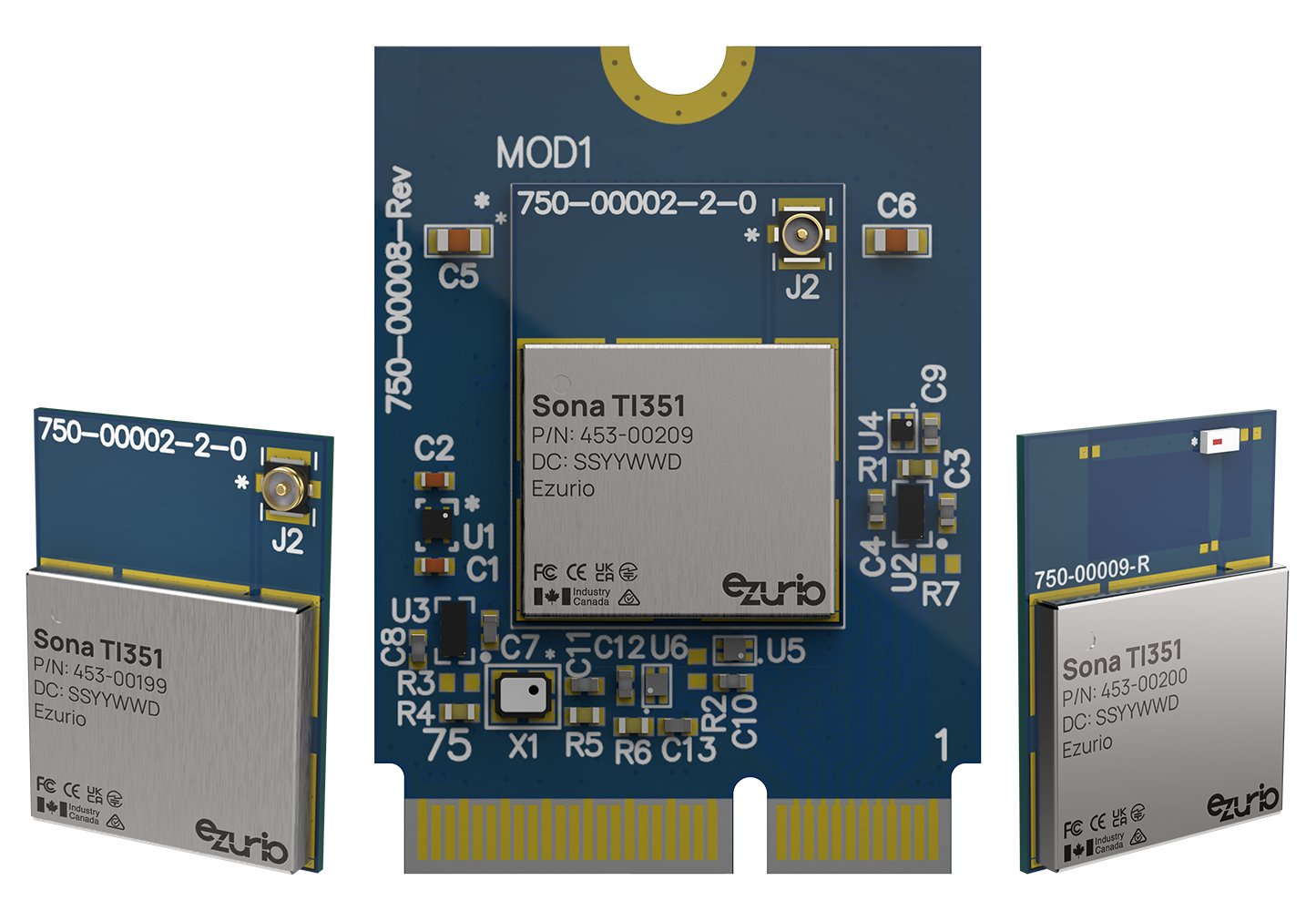
Introducing the newest member of the Sona™ Wi-Fi 6 product line from Ezurio, the TI351, based upon Texas Instruments CC3351 chipset. A truly robust industrial IoT module: one that’s rugged, small, globally certified, has reliable connectivity, and is easy to integrate.
Our new Sona™ TI351 answers the call for next-gen wireless IoT. The Sona™ TI351 is purpose-built for industrial IoT connectivity with access to SDIO and UART interfaces, industrial operating temp range, latest generation Wi-Fi and BT LE combined with both pluggable card and SMT M.2 packaging.
When matched with our industry leading services and support, the Sona TI351 is the only Wi-Fi module of its kind, addressing all your Wi-Fi 6 needs.
Buy Now
| Seller | Stock | Buy |
|---|---|---|
 |
8187 in stock | Buy |
 |
313 in stock | Buy |
 |
0 in stock | Buy |
|
0 in stock | Buy |
|
250 in stock | Buy |
 |
250 in stock | Buy |
 |
244 in stock | Buy |
|
244 in stock | Buy |
|
50 in stock | Buy |
|
0 in stock | Buy |
 |
0 in stock | Buy |
|
1429 in stock | Buy |
|
859 in stock | Buy |
|
0 in stock | Buy |
|
0 in stock | Buy |
|
17 in stock | Buy |
|
15 in stock | Buy |
|
10 in stock | Buy |
| 3 in stock | Buy | |
|
3 in stock | Buy |
|
2 in stock | Buy |
|
0 in stock | Buy |
|
509 in stock | Buy |
|
390 in stock | Buy |
|
241 in stock | Buy |
|
241 in stock | Buy |
|
235 in stock | Buy |
|
0 in stock | Buy |
|
0 in stock | Buy |
|
1878 in stock | Buy |
|
920 in stock | Buy |
| 0 in stock | Buy | |
|
0 in stock | Buy |
|
0 in stock | Buy |
|
608 in stock | Buy |
|
187 in stock | Buy |
|
97 in stock | Buy |
|
0 in stock | Buy |
|
0 in stock | Buy |
|
94 in stock | Buy |
|
72 in stock | Buy |
|
0 in stock | Buy |
|
26 in stock | Buy |
|
24 in stock | Buy |
|
0 in stock | Buy |
|
0 in stock | Buy |
|
0 in stock | Buy |
|
216 in stock | Buy |
|
0 in stock | Buy |
|
0 in stock | Buy |
|
0 in stock | Buy |
|
6 in stock | Buy |
|
0 in stock | Buy |
|
0 in stock | Buy |
|
0 in stock | Buy |
|
2754 in stock | Buy |
|
894 in stock | Buy |
|
390 in stock | Buy |
|
0 in stock | Buy |
|
174 in stock | Buy |
|
0 in stock | Buy |
|
3157 in stock | Buy |
|
2537 in stock | Buy |
|
0 in stock | Buy |
|
0 in stock | Buy |
|
19494 in stock | Buy |
|
6557 in stock | Buy |
|
193 in stock | Buy |
|
94 in stock | Buy |
|
0 in stock | Buy |
|
0 in stock | Buy |
EZ Connectivity Stack
Not just a driver. The whole stack.
The wireless software layer that fits your environment — not the other way around. 75+ kernel versions supported (v2.6–v6.12+), bi-annual CVE releases, WPA3 Enterprise + EAP-FAST, and Adaptive Worldwide Mode. When an Ezurio Wi-Fi module is in your SOM, the full connectivity stack comes with it — one vendor for silicon and software.



Compatible
Our Linux Backports package supports many Linux kernels including the latest LTS kernel. Learn More
Reliable
Integrated PA (Power Amplifier) and LNA (Low Noise Amplifier) with 1x1 SISO antenna for reliable connectivity in harsh RF environments.
Robust
Rich feature-set including 802.11ax Wi-Fi 6 and BT LE v5.4. Reliable industrial temperature range, and solder-down module make it suitable for industrial rugged applications.
Secure
Supports the latest WPA2/3 personal and Enterprise security standards.
Pre-certified Antennas
Simplifies development and speeds time to market with reduced certification efforts
Dev Kits
Jumpstart your development in minutes with our powerful development kits.
/filters:background_color(white)/2024-08/453-00200-K1.png)
/filters:background_color(white)/2025-07/STM32_to_2230_Adapter%2C_M_2_2230%20Render-front.569.png)
Certified Antennas
Simplify compliance with antennas tested and certified for this module.
-
/filters:background_color(white)/2024-03/FlexPiFa2-5Ghz_LC.png)
001-0021
FlexPIFA / FlexPIFA 6E Flexible Adhesive-Backed PIFA Internal Antennas
Dual band antenna with MHF4L connector
-
EFB2455A3S-15MH4L
FlexPIFA / FlexPIFA 6E Flexible Adhesive-Backed PIFA Internal Antennas
-
/filters:background_color(white)/2024-10/FlexPIFA%206E3.png)
EFB2471A3S-10MH4L
FlexPIFA / FlexPIFA 6E Flexible Adhesive-Backed PIFA Internal Antennas
-
/filters:background_color(white)/s3fs-public/2018-10/EMF2449.jpg)
EMF2449A1-10MH4L
Mini NanoBlade Flex / Flex 6E Series Internal Antenna
-
/filters:background_color(white)/2024-12/EMF2471.png)
EMF2471A3S-10MH4L
Mini NanoBlade Flex / Flex 6E Series Internal Antenna
-
/filters:background_color(white)/2024-11/NANOBLADE1.png)
ENB2449A1-10MH4L
Nanoblade Series Internal Antenna
Specifications
Connectivity
Bluetooth v5.4 (BLE)
Onboard MHF4 Connector
Shared Wi-Fi and BT antenna RF connections
Processing
Environment
Packaging
M2. 2230 E-Key (Pluggable)
Interface
| Part Number | Price @ 1K | Antenna Type | Bulk or Single | Chipset (Wireless) | Form Factor | Frequency | Interfaces - General | Packaging | Product Type | System Architecture | Technology |
|---|---|---|---|---|---|---|---|---|---|---|---|
/filters:background_color(white)/2024-04/Sona%20TI351-453-00199-front.323.png) 453-00199C Active Buy Options | N/A | 1x MHF4L Connector | Bulk | TI CC3351 | M.2 1216 (SMT) | 2.4 / 5GHz | SDIO 3.0 (Wi-Fi), HCI using HS-UART (BT) | Cut Tape | Embedded Module | Hosted | Wi-Fi 6, Bluetooth 5.4 |
453-00199R Active Buy Options | N/A | 1x MHF4L Connector | Bulk | TI CC3351 | M.2 1216 (SMT) | 2.4 / 5GHz | SDIO 3.0 (Wi-Fi), HCI using HS-UART (BT) | Tape and Reel | Embedded Module | Hosted | Wi-Fi 6, Bluetooth 5.4 |
/filters:background_color(white)/2024-04/Sona%20TI351-453-00200-front.324.png) 453-00200C Active Buy Options | N/A | Chip Antenna | Bulk | TI CC3351 | M.2 1216 (SMT) | 2.4 / 5GHz | SDIO 3.0 (Wi-Fi), HCI using HS-UART (BT) | Cut Tape | Embedded Module | Hosted | Wi-Fi 6, Bluetooth 5.4 |
453-00200R Active Buy Options | N/A | Chip Antenna | Bulk | TI CC3351 | M.2 1216 (SMT) | 2.4 / 5GHz | SDIO 3.0 (Wi-Fi), HCI using HS-UART (BT) | Tape and Reel | Embedded Module | Hosted | Wi-Fi 6, Bluetooth 5.4 |
/filters:background_color(white)/2024-04/Sona%20TI351-453-00209-front.322.png) 453-00209 Active Buy Options | N/A | 1x MHF4L Connector | Single | TI CC3351 | M.2 2230 (pluggable) | 2.4 / 5GHz | SDIO 3.0 (Wi-Fi), HCI using HS-UART (BT) | Single | Embedded Module | Hosted | Wi-Fi 6, Bluetooth 5.4 |
Documentation
Browse Application Notes, Certifications, Datasheets, Documentation, Product Briefs, Software and Technical Drawings in our Support & Documentation Center.
hciconfig -a shows error messages when I use it with the Sona TI351.
hciconfig has been deprecated and it is recommended to use bluetoothctl with BlueZ 5.x.
hcitool is limited to classic Bluetooth functionality. The Sona TI351 radio is BLE only and does not have support for classic Bluetooth.
I can’t get the Sona TI351 to come up on a platform that also has an Ezurio 60 Series radio (or vice versa).
Both the Sona TI351 and the Ezurio 60 Series radios require a radio specific regulatory database. They cannot both be activated at the same time. Whichever driver loads first will work; the second to load will fail.
If you have a platform where both radios are present, you will need to blacklist the one you don’t need so the other will come up.
Note: co-located radios, where two radios are active at the same time, is not permitted under the Ezurio modular certification and is not tested or supported. Radio co-location requires additional testing and documentation to prove compliance, along with a Change Of ID.
My phone will not connect to the Sona TI351 over Bluetooth but I can get other devices to connect.
The TI351 won’t connect to a smartphone unless the le resolver is explicitly enabled. This can be done using the hcitool with the command: hcitool -i hci0 lerlon
How many clients are supported in AP mode on the Sona TI351?
The Sona TI351 is configured to support a maximum of 16 clients in AP mode. Please note that the more clients associated, the more resources are taken up. This will cause performance degradation on all of the devices.
Do I need to control the W_DISABLE# signal on the Sona TI351?
Yes, there is a watchdog mechanism in the Sona TI351 that will detect an issue and reset the radio. To accomplish this, there needs to be GPIO control over the W_DISABLE# signal. This is typically implemented with a regulator construct in the device tree.
Please see the Sona TI Software Integration Guide for more information and a sample Device Tree.
Is Wi-Fi Wake On Wireless supported on the Sona TI351?
Wake On Wireless is supported on the Sona TI351 Wi-Fi interface, however it requires that Out Of Band (GPIO) IRQ is used via the SDIO_WAKE#/HOST_IRQ_WL signal. Note that when using the M.2 1216 module this signal is active high (HOST_IRQ_WL), and when using the M.2 2230 module this signal is inverted on the carrier board (SDIO_WAKE#) to be active low for compliance with the M.2 specification.
Please see the Sona TI Software Integration Guide for more information and a sample Device Tree.
My device hangs when I try to use Bluetooth on the Sona TI351. The radio is connected to a FTDI USB to Serial Interface. Is this a problem?
Yes, the Sona TI351 Bluetooth radio requires that the host must immediately stop transmitting when RTS is asserted. If even one byte is transmitted then the firmware will hang. You must disable the power saving “autonomous” mode before enabling the Bluetooth interface.
echo "0" > /sys/kernel/debug/ieee80211/wlan0/cc33xx/sleep_auth
What are the Bluetooth UART interface requirements on the Sona TI351?
The Sona TI351 UART requires RTS/CTS hardware handshaking and operates at 115200 baud. In addition, the host must immediately stop transmitting when RTS is asserted. If the host sends even one byte after RTS is asserted the firmware will hang.
If this is a problem, then the host must disable the power saving “autonomous” mode before enabling the Bluetooth interface.
echo "0" > /sys/kernel/debug/ieee80211/wlan0/cc33xx/sleep_auth
I can’t get Bluetooth to start on the Sona TI351
There is only one core on the Sona TI351 and it handles both Wi-Fi and Bluetooth. Bluetooth functionality must be enabled from user space through the ble_enable pseudofile in the Wi-Fi debugfs interface. For more information, please see the Runtime Validation section of the Sona TI Software Integration Guide
I’m getting a power on failure with “failed to get sync (-13)” message in dmesg with the Sona TI351
PM run time must be enabled on the SDIO interface for this driver as documented in the Software Integration guide. Ensure that the cap-power-off-card property is set in the mmc/sdio node used with the Sona TI351.
How do I configure the TI351 to use Out of Band interrupt
The SDIO interrupt can be either in-band or out of band. If Wake On Wireless is desired, then the interrupt must be out of band. The HOST_IRQ_WL signal on the cc3351 is the external interrupt signal. This is an active high signal from the cc3351 and is produced directly on the M.2 1216 module as HOST_IRQ_WL. This signal is inverted on the M.2 2230 carrier board for compliance with the M.2 specification and produced on the SDIO_WAKE# pin.
So if using the solder down M.2 1216 module, the OOB interrupt is HOST_IRQ_WL and is active high. If using the M.2 2230 plug in module the OOB interrupt is SDIO_WAKE# and is active low.
The pin should be configured as a LEVEL sensitive interrupt, not an EDGE sensitive interrupt. You may miss interrupts if configuring it for EDGE sensitive. Note that some processors do not support LEVEL interrupts, so SDIO in-band is the preferred option in this case.
Please see the Sona TI Software Integration Guide for more information and a sample Device Tree.
TI351 M.2 1216 solder down module does not enumerate
The SDIO_WAKE#/HOST_IRQ_WL signal is a SenseOnPower pin that must be low at the input to the cc3351 chip itself when the device is powered up. There is an internal pull-down on this signal, but the host platform must ensure it is not driven high before the Sona TI351 is powered up. If that cannot be guaranteed, this signal must be buffered.
This signal is the active high HOST_IRQ_WL signal when using the M.2 1216 module. It is inverted on the M.2 2230 carrier board and exposed as SDIO_WAKE# to make it active low for M.2 compliance. This issue does not apply to the M.2 2230 module variant because that inverter buffers the HOST_IRQ_WL signal from the host.
Please see the Sona TI Software Integration Guide for more information and a sample Device Tree.
How can I use Ezurios Sona-TI351 with BeagleBone Black?
You can follow this link to a document that details the steps for integrating The Sona-TI351 with the Beagle Bone Black DVK: TI351 with BBB
What interfaces does the Sona TI351 use for Wi-Fi and Bluetooth?
The Sona MT320 uses SDIO 2.0 for Wi-Fi and HS-UART for Bluetooth.
What Bluetooth features are supported in the Sona TI351?
The Sona MT320 is a 5.4 spec Single-Mode BLE radio. The primary Bluetooth features are:
- LE 2 Mbps PHY
- LE Long Range (LE-LR)
- UART baud rates upto 4 Mbps
- Advertising Extensions
How do I configure AP-Sta mode using nmcli?
An Ezurio Wi-Fi module can be configured for AP-Sta mode with the following nmcli commands:
- iw dev wlan0 interface add wlan1 type __ap
- nmcli con add con-name myap ifname wlan1 type wifi ssid myapssid autoconnect yes 802.11-wireless.mode ap ipv4.method shared
- nmcli con add con-name mysta ifname wlan0 type wifi ssid mystassid
This is assumes that you have the iw and dnsmasq packages installed in your build.
Note: In the above configuration, the Access Point will follow the channel that the station associates to. Therefore it is reccomended that the client is configured to use a 2.4 GHz channel or the U-NII-1 channels in the 5 GHz band as the Ezurio radios will not work as DFS masters and do not support AP mode in the rest for the 5 GHz channels nor in the 6 GHz band.>
Is there a conflict between NetworkManager and systemd-networkd?
Yes, If you decide to use NetworkManager, then systemd-networkd should be removed from the system. We would recommend changing Yocto systemd PACKAGECONFIG to not build it into image.
Does the Sona TI351 Wi-Fi Module support 40MHz Wi-Fi channels?
The Sona TI351 Wifi module only supports 20MHz wide Wi-Fi channels.
If your application requires wider Wi-Fi channels, please refer to Ezurios Wi-Fi Modules
Does the Sona-TI351 have to be supplied with a 32kHz clock signal?
Yes, the Sona-TI351 requires a 32.768 kHz signal to function.
That signal can be generated internally by the chip-set itself by leaving the SUSCLK / SLOW_CLK_IN pin unconnected. This comes with the benefit of having less components on the PCB. But also comes with the caveat of being less accurate and more power consuming compared to sourcing that signal externally.
For optimal power consumption, the slow clock can be generated externally by an oscillator or sourced from
elsewhere in the system, e.g. a GPIO from the host processor.
The external source must meet the requirements shown in below table and must be be fed into the SUSCLK / SLOW_CLK_IN pin and must be stable before nReset is de-asserted and device is enabled.
External Slow Clock Requirements

Does the Sona TI351 Wi-Fi Module support Classic Bluetooth?
The Sona TI351 Wifi module only supports Bluetooth Low Energy (BLE).
If your application also requires the Bluetooth classic, please refer to Ezurios Wi-Fi Modules
ST60
https://www.ezurio.com/wireless-modules/wifi-modules-bluetooth/60-sipt-bluetooth-and-wifi-module
https://www.ezurio.com/wireless-modules/wifi-modules-bluetooth/60-2230c-series-bluetooth-and-wifi-module
Sona IF513
https://www.ezurio.com/wireless-modules/wifi-modules-bluetooth/sona-if513-wifi-6e-bluetooth-5-4-module
Sona IF573
https://www.ezurio.com/wireless-modules/wifi-modules-bluetooth/sona-if573-wi-fi-6e-bluetooth-5-4-module
Sona MT320
https://www.ezurio.com/wireless-modules/wifi-modules-bluetooth/sona-mt320-wifi-6-bluetooth-5-3-module
Sterling LWB5+
https://www.ezurio.com/wireless-modules/wifi-modules-bluetooth/sterling-lwb5-plus-wifi-5-bluetooth-5-module
Sterling LWB+
https://www.ezurio.com/wireless-modules/wifi-modules-bluetooth/sterling-lwb-wifi-4-and-bluetooth-52-modules
Become an Ezurio Customer to Gain Exclusive Access to Our Design Experts
- Antenna Scans
- Antenna selection and placement
- Custom antenna design
- Worldwide EMC testing / certifications
- Embedded RF hardware / firmware design
- Cloud architecture and integration
- Mobile application development
- Product & Industrial Design
Distributors
| Distributor | Phone Number | Region | Website |
|---|---|---|---|
| Arrow Electronics | 1-855-326-4757 +44 2039 365486 |
APAC, North America, South America, EMEA | Website |
| Braemac Australia, New Zealand, South East Asia | +61 2 9550 6600 +64 9 477 2148 |
APAC | Website |
| DigiKey | 1-800-344-4539 |
North America, South America, APAC, EMEA | Website |
| EBV Elektronik | EMEA | Website | |
| Farlink Technology China, Hong Kong | +86 13266922199 |
APAC | Website |
| Farnell | 1-800-936-198 +44 3447 11 11 22 |
EMEA | Website |
| Future Electronics | 1-800-675-1619 1-514-428-8470 |
North America, South America, APAC, EMEA | Website |
| Glyn | +49-6126-590-0 |
EMEA | Website |
| Hy-Line Germany Only | +49 89 614 503 0 |
EMEA | Website |
| Jetronic China, Hong Kong and Taiwan | 852-27636806 |
APAC | Website |
| M2M Germany | +49-6081-587386-0 |
EMEA | Website |
| Martinsson | +46 8 7440300 |
EMEA | Website |
| McCoy South East Asia | +65 6515 2988 |
APAC | Website |
| Mouser Electronics | 1-800-346-6873 +44 1494 427500 |
North America, South America, APAC, EMEA | Website |
| RS | +852-2421-9898 +44 3457-201201 |
North America, South America, APAC, EMEA | Website |
| Solsta UK Only | +44 (0) 1527 830800 |
EMEA | Website |
| Supreme Components International India, South East Asia | +65 6848-1178 |
APAC | Website |
| Symmetry Electronics | 1-866-506-8829 |
North America | Website |
| Tekdis Australia and New Zealand | +61 3 8669 1210 |
APAC | Website |
| Telsys | +972 3 7657666 |
EMEA | Website |
| WPG | +44 1628 958460 |
EMEA | Website |